
🐇 RabbitLala Flutter SDK
rabitlala_flutter_sdk is a Flutter SDK that allows businesses to easily initiate and complete payments via RabbitLala secure checkout system.
🚀 Features
- Launch hosted payment checkout via RabbitLala
- Mobile-friendly integration
- Lightweight and easy to integrate
- Backend-driven payment flow via payment reference
📦 Installation
Add the SDK to your pubspec.yaml:
flutter pub add rabitlala_flutter_sdk
🧑💻 Usage
✅ Import the package:
import 'package:rabitlala_flutter_sdk/rabbitlala.dart';
✅ Initialize the SDK:
Rabbitlala.initialize(mode: Modes.demo); // Modes.live by default
✅ Trigger the checkout flow:
Rabbitlala.checkout(
  context,
  paymentRef: 'your-generated-payment-reference',
);
ℹ️ The
paymentRefis generated on your backend and passed to the SDK to trigger the RabbitLala checkout page.
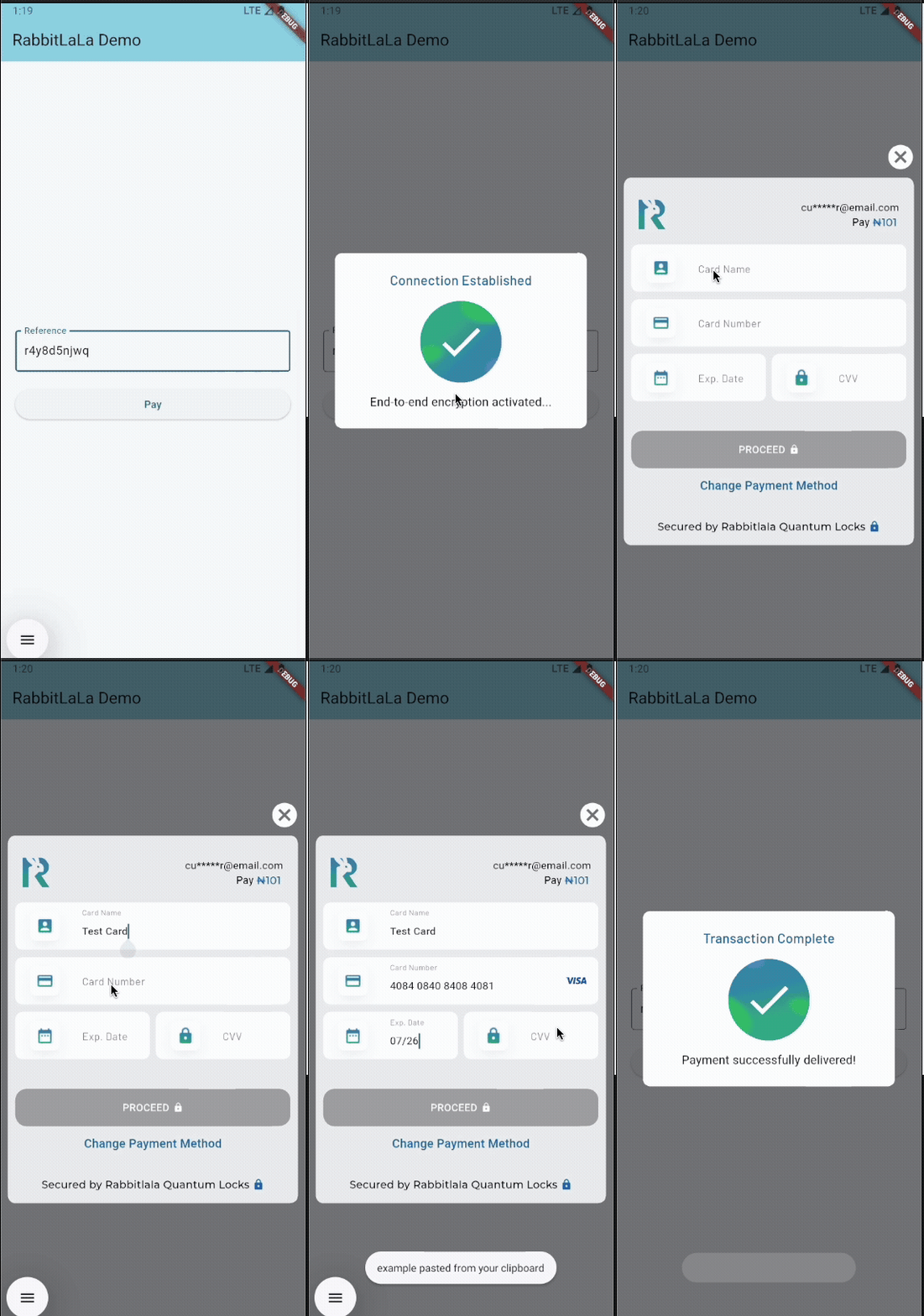
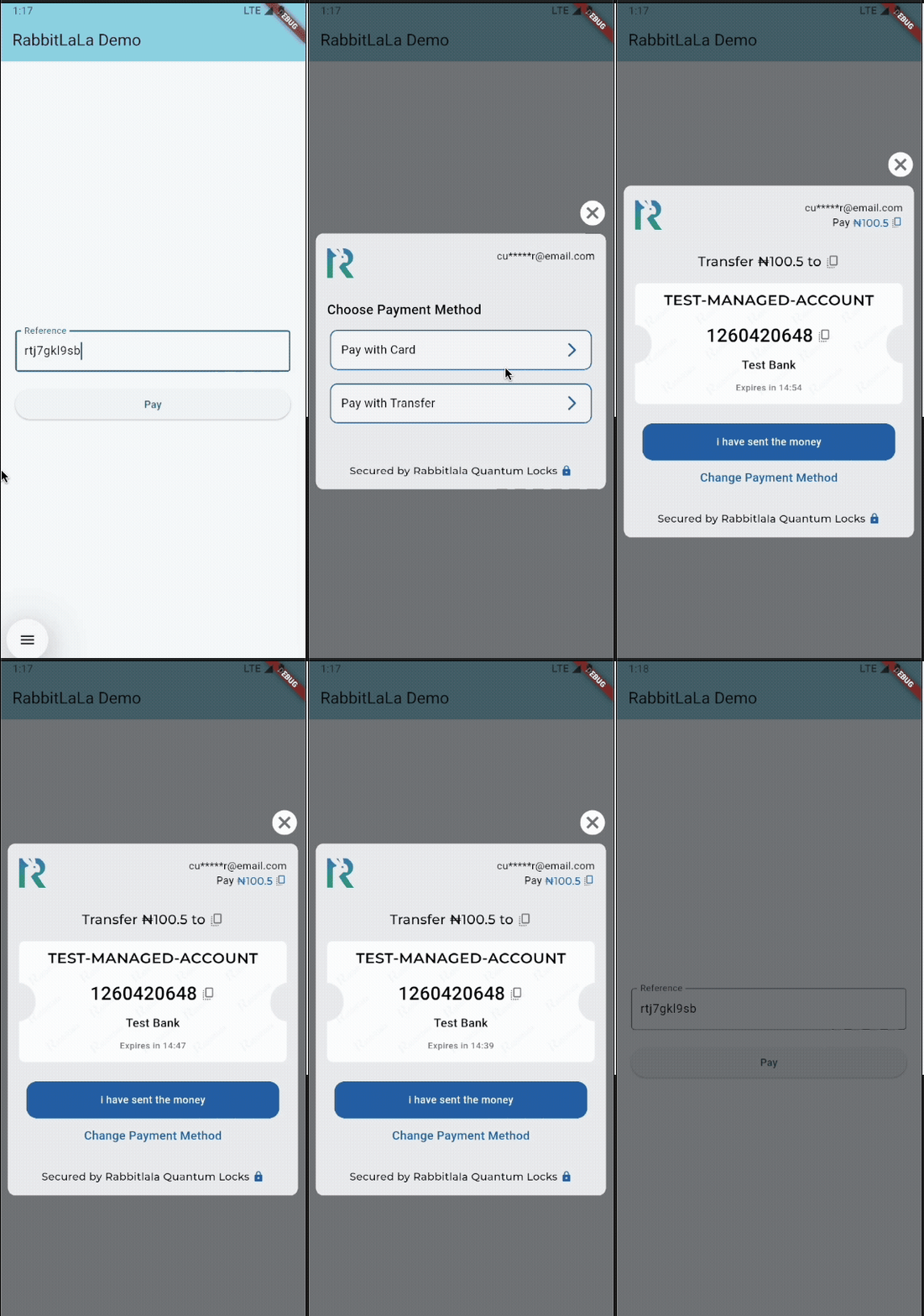
🖼️ Demo
Here’s a quick look at the RabbitLala checkout experience:
🖼️ Example UI Integration
import 'dart:developer';
import 'package:flutter/material.dart';
import 'package:rabitlala_flutter_sdk/rabbitlala.dart';

void main() {
  WidgetsFlutterBinding.ensureInitialized();
  Rabbitlala.initialize(mode: Modes.demo);
  runApp(const MyApp());
}

class MyApp extends StatelessWidget {
  const MyApp({super.key});
  @override
  Widget build(BuildContext context) {
    return MaterialApp(
      title: 'RabbitLala Demo',
      theme: ThemeData(
        colorScheme: ColorScheme.fromSeed(seedColor: const Color(0xEC34C8DF)),
      ),
      home: const MyHomePage(title: 'RabbitLala Demo'),
    );
  }
}

class MyHomePage extends StatefulWidget {
  const MyHomePage({super.key, required this.title});
  final String title;

  @override
  State<MyHomePage> createState() => _MyHomePageState();
}

class _MyHomePageState extends State<MyHomePage> {
  final reference = TextEditingController(text: "PL-DDLLQ4QIXY");

  @override
  Widget build(BuildContext context) {
    return Scaffold(
      appBar: AppBar(
        backgroundColor: Theme.of(context).colorScheme.inversePrimary,
        title: Text(widget.title),
      ),
      body: Center(
        child: Padding(
          padding: const EdgeInsets.all(20),
          child: Column(
            mainAxisAlignment: MainAxisAlignment.center,
            children: <Widget>[
              TextFormField(
                controller: reference,
                decoration: const InputDecoration(
                  labelText: "Reference",
                  border: OutlineInputBorder(),
                ),
              ),
              const SizedBox(height: 20),
              ElevatedButton(
                onPressed: () {
                  try {
                    Rabbitlala.checkout(
                      context,
                      paymentRef: reference.text,
                    ).then((status) {
                      log("status":"$status");
                      if (!context.mounted) return;
                      showDialog(
                        context: context,
                        builder: (_) => AlertDialog(
                          content: const Text("Checkout complete"),
                        ),
                      );
                    });
                  } catch (e) {
                    log("Error launching checkout: $e");
                  }
                },
                child: const Text("Pay"),
              ),
            ],
          ),
        ),
      ),
    );
  }
}
📦 Payment Status Reference
Here’s what each value means:
| Status | Description |
|---|---|
success |
Payment was completed and received successfully. |
pending |
Payment is pending. A webhook will be sent to your server if it completes. |
processed |
Payment was previously handled, either as success or failed. |
null |
User abandoned the process or closed the SDK without completing payment. |
🧾 License
This project is licensed under the MIT License. See the LICENSE file for details.
📞 Support
- Website: https://rabbitlala.ng
- Email: support@rabbitlala.ng