
YouTube Player Pro for Flutter
A powerful and customizable YouTube player package for Flutter with fullscreen support, custom controls, and seamless WebView integration.


🎬 Preview
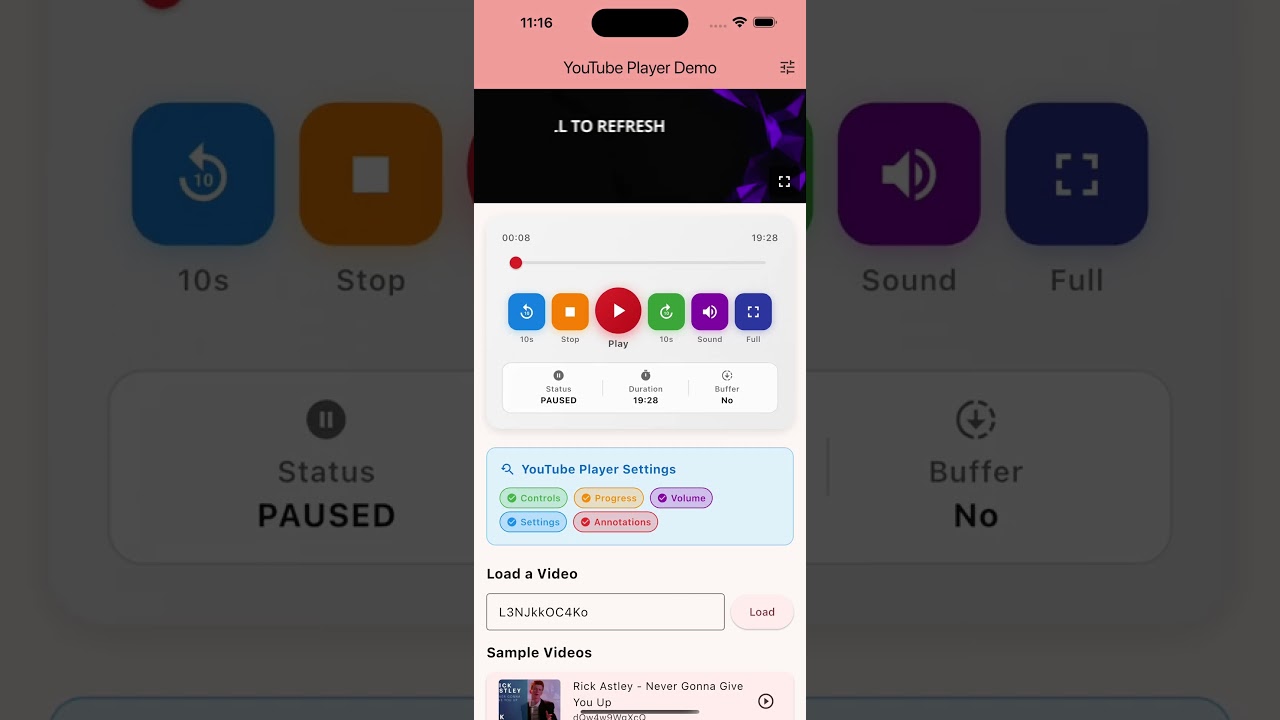
Features
✨ Rich Feature Set
- 🎥 Play YouTube videos using WebView
- 📺 Fullscreen mode with landscape orientation
- 🎨 Beautiful custom player controls
- 🔊 Volume control (mute/unmute)
- ⏯️ Playback controls (play, pause, stop)
- ⏭️ Seek controls (forward/backward 10 seconds)
- 📊 Real-time progress bar
- 🎬 Player state management
- 🖼️ Video thumbnail generation
- 🔗 URL to video ID extraction
- ⚙️ Customizable YouTube player settings
- 🚪 Always-visible exit button in fullscreen
- 🌐 Cross-platform support (iOS, Android, Web, macOS, Linux, Windows)
Installation
Add this to your package's pubspec.yaml file:
dependencies:
  youtube_player_pro: ^1.0.1
Then run:
flutter pub get
Platform-Specific Setup
Android
Add the following to your android/app/src/main/AndroidManifest.xml:
<uses-permission android:name="android.permission.INTERNET" />
<uses-permission android:name="android.permission.ACCESS_NETWORK_STATE" />
iOS
Add the following to your ios/Runner/Info.plist:
<key>io.flutter.embedded_views_preview</key>
<true/>
<key>NSAppTransportSecurity</key>
<dict>
    <key>NSAllowsArbitraryLoads</key>
    <true/>
</dict>
Usage
Basic Example
import 'package:flutter/material.dart';
import 'package:youtube_player_pro/youtube_player.dart';

class MyApp extends StatefulWidget {
  @override
  _MyAppState createState() => _MyAppState();
}

class _MyAppState extends State<MyApp> {
  late YoutubePlayerController _controller;

  @override
  void initState() {
    super.initState();
    _controller = YoutubePlayerController(
      videoId: 'dQw4w9WgXcQ',
      autoPlay: true,
      showControls: true,
    );
  }

  @override
  Widget build(BuildContext context) {
    return Scaffold(
      appBar: AppBar(title: Text('YouTube Player')),
      body: YoutubePlayer(
        controller: _controller,
        enableFullscreen: true,
      ),
    );
  }

  @override
  void dispose() {
    _controller.dispose();
    super.dispose();
  }
}
Advanced Usage with Custom Controls
import 'package:flutter/material.dart';
import 'package:youtube_player_pro/youtube_player.dart';

class AdvancedPlayer extends StatefulWidget {
  @override
  _AdvancedPlayerState createState() => _AdvancedPlayerState();
}

class _AdvancedPlayerState extends State<AdvancedPlayer> {
  late YoutubePlayerController _controller;

  @override
  void initState() {
    super.initState();
    _controller = YoutubePlayerController(
      videoId: 'L3NJkkOC4Ko',
      autoPlay: false,
      showControls: true,
      mute: false,
    );
  }

  @override
  Widget build(BuildContext context) {
    return Scaffold(
      body: Column(
        children: [
          // YouTube Player
          YoutubePlayer(
            controller: _controller,
            enableFullscreen: true,
            backgroundColor: Colors.black,
          ),

          // Custom Controls
          ValueListenableBuilder(
            valueListenable: _controller,
            builder: (context, value, child) {
              return Column(
                children: [
                  // Progress Bar
                  Slider(
                    value: value.position.inSeconds.toDouble(),
                    max: value.duration.inSeconds.toDouble(),
                    onChanged: (val) {
                      _controller.seekTo(Duration(seconds: val.toInt()));
                    },
                  ),

                  // Control Buttons
                  Row(
                    mainAxisAlignment: MainAxisAlignment.center,
                    children: [
                      IconButton(
                        icon: Icon(Icons.replay_10),
                        onPressed: () {
                          final newPos = value.position - Duration(seconds: 10);
                          _controller.seekTo(newPos);
                        },
                      ),
                      IconButton(
                        icon: Icon(
                          value.isPlaying ? Icons.pause : Icons.play_arrow,
                        ),
                        onPressed: () {
                          if (value.isPlaying) {
                            _controller.pause();
                          } else {
                            _controller.play();
                          }
                        },
                      ),
                      IconButton(
                        icon: Icon(Icons.forward_10),
                        onPressed: () {
                          final newPos = value.position + Duration(seconds: 10);
                          _controller.seekTo(newPos);
                        },
                      ),
                      IconButton(
                        icon: Icon(
                          value.volume > 0 ? Icons.volume_up : Icons.volume_off,
                        ),
                        onPressed: () {
                          if (value.volume > 0) {
                            _controller.setVolume(0);
                          } else {
                            _controller.setVolume(100);
                          }
                        },
                      ),
                      IconButton(
                        icon: Icon(Icons.fullscreen),
                        onPressed: () {
                          _controller.enterFullscreen();
                        },
                      ),
                    ],
                  ),
                ],
              );
            },
          ),
        ],
      ),
    );
  }

  @override
  void dispose() {
    _controller.dispose();
    super.dispose();
  }
}
Extract Video ID from URL
String? videoId = YoutubeHelper.extractVideoId('https://www.youtube.com/watch?v=dQw4w9WgXcQ');
// Returns: 'dQw4w9WgXcQ'
Get Thumbnail URL
String thumbnailUrl = YoutubeHelper.getThumbnailUrl(
  'dQw4w9WgXcQ',
  quality: ThumbnailQuality.high,
);
API Reference
YoutubePlayerController
| Property | Type | Description |
|---|---|---|
videoId |
String | YouTube video ID |
autoPlay |
bool | Auto-play video on load |
showControls |
bool | Show YouTube native controls |
mute |
bool | Mute video on load |
startSeconds |
int | Start position in seconds |
| Method | Description |
|---|---|
play() |
Start video playback |
pause() |
Pause video playback |
stop() |
Stop video playback |
seekTo(Duration) |
Seek to specific position |
setVolume(int) |
Set volume (0-100) |
muteVideo() |
Mute the video |
unMuteVideo() |
Unmute the video |
enterFullscreen() |
Enter fullscreen mode |
exitFullscreen() |
Exit fullscreen mode |
loadVideoById(String) |
Load new video |
YoutubePlayerValue
| Property | Type | Description |
|---|---|---|
isPlaying |
bool | Is video playing |
isFullscreen |
bool | Is in fullscreen mode |
isReady |
bool | Is player ready |
hasError |
bool | Has error occurred |
errorMessage |
String? | Error message if any |
position |
Duration | Current playback position |
duration |
Duration | Total video duration |
isBuffering |
bool | Is video buffering |
playerState |
PlayerState | Current player state |
volume |
int | Current volume (0-100) |
📸 Preview / معاينة
Video Demo / فيديو توضيحي
Features in Action / المميزات في العمل
- ✅ YouTube video playback
- ✅ Custom player controls with beautiful UI
- ✅ Fullscreen mode with landscape orientation
- ✅ Volume control (mute/unmute)
- ✅ Seek controls (forward/backward)
- ✅ Real-time progress tracking
- ✅ Always-visible exit button in fullscreen
Screenshots
Coming soon...
Example App
Check out the example app for a complete implementation.
Contributing
Contributions are welcome! Please feel free to submit a Pull Request.
License
This project is licensed under the MIT License - see the LICENSE file for details.
Support
If you like this package, please give it a ⭐ on GitHub!
Acknowledgments
- Built with webview_flutter
- Uses YouTube iFrame API
Changelog
See CHANGELOG.md for a detailed list of changes.
Libraries
- main
- youtube_player
- YouTube Player Pro for Flutter