
animated_rating_feedback 0.1.0  animated_rating_feedback: ^0.1.0 copied to clipboard
 innoventixsolutions.com
A Flutter package to create animated feedback rating systems with emojis, icons, and dynamic feedback options. Includes text-to-speech (TTS) functionality.
📦 animated_feedback_rating with TTS 🔊 #
A customizable Flutter package to create animated feedback rating systems with TTS (Text-to-Speech) functionality. 🎤
Supports emoji, icons, dynamic feedback options, and smooth animations ✨.
⚙️ How It Works #
The AnimatedFeedbackRating widget provides an easy-to-use interface to collect ratings and short feedback from users.
Once a rating is selected (e.g., star, smiley, heart, etc.), Text-to-Speech (TTS) functionality speaks the selected rating and feedback aloud.
Key Features: #
- ⭐ Different rating types (star, smiley, thumb, heart, etc.).
- 📝 Short, predefined feedback options after selecting a rating.
- 🎤 Text-to-Speech functionality to speak feedback and rating choices.
- 🌟 Fully customizable with smooth animations and easy integration.
- 🎨 Controller-based architecture for simple state management.
- 🔥 Easy integration into your Flutter projects.
✨ Features #
- ✅ Cascading rating types: Star, Smiley, Thumb, Heart, etc.
- 🎤 Text-to-Speech (TTS) functionality to speak ratings and feedback.
- 🔍 Select feedback with smooth animations.
- ✅ Single & multi-selection support for feedback options.
- ➕ "Add Other" option for user-defined entries of icons.
- 🧠 Controller-based architecture for simple and clean state management.
- 🛠️ Minimal setup with flexible data models.
📸 Screenshots #
-
Rating Screen:

-
Feedback Options:

-
Customizable UI:

▶ Demo Video #
Check out the demo videos to see the package in action:
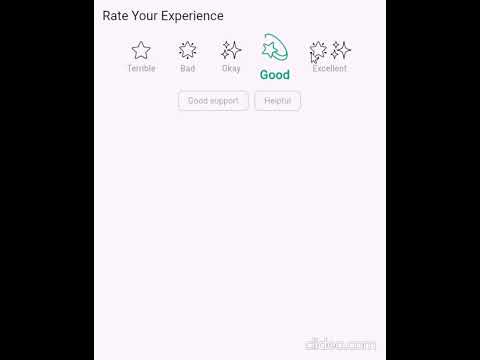
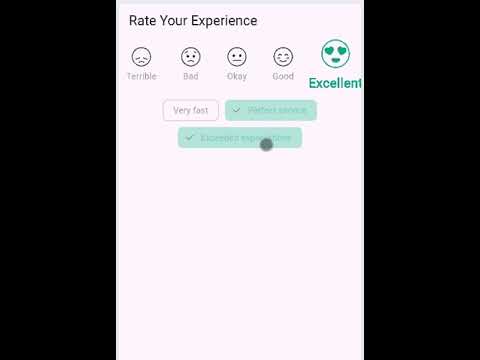
This video demonstrates the Text-to-Speech (TTS) feature in action with Star rating.
🚀 Getting Started #
Add this dependency to your pubspec.yaml:
dependencies:
  animated_feedback_rating: ^0.1.0  # Latest version of the package
  flutter_tts: ^4.2.2  # Text-to-Speech functionality for speaking feedback and ratings aloud
---
flutter pub get

---
🛠️ How to Use
final controller = RatingController<String>(
  ratingOptions: [
    RatingOption(id: '1', label: 'Terrible', value: 'terrible', emoji: '😞', icon: Icons.sentiment_very_dissatisfied),
    RatingOption(id: '2', label: 'Bad', value: 'bad', emoji: '😟', icon: Icons.sentiment_dissatisfied),
    RatingOption(id: '3', label: 'Okay', value: 'okay', emoji: '😐', icon: Icons.sentiment_neutral),
    RatingOption(id: '4', label: 'Good', value: 'good', emoji: '😊', icon: Icons.sentiment_satisfied),
    RatingOption(id: '5', label: 'Excellent', value: 'excellent', emoji: '😍', icon: Icons.sentiment_very_satisfied),
  ],
  feedbackOptionsMap: {
    '1': [FeedbackItem(id: 'f1', text: 'Not helpful'), FeedbackItem(id: 'f2', text: 'Too slow')],
    '5': [FeedbackItem(id: 'f3', text: 'Excellent help!'), FeedbackItem(id: 'f4', text: 'Very fast')],
  },
);


---

- Use the Widget

AnimatedFeedbackRating<String>(
  controller: controller,
)
--
🚀 Made with Flutter 💙
Metadata
Publisher
Weekly Downloads
Metadata
A Flutter package to create animated feedback rating systems with emojis, icons, and dynamic feedback options. Includes text-to-speech (TTS) functionality.
Repository (GitHub)
View/report issues
Documentation
License
 MIT (license)

