
flutter_animated_login 1.0.1  flutter_animated_login: ^1.0.1 copied to clipboard
 mohesu.com
A Flutter package to create a beautiful animated login screen with phone/email otp, password, and social login options. It also includes a phone number with country code picker.
Flutter Animated Login
A complete, animated sign-in flow in one widget.
One-time codes, passwords, sign-up, password reset and social providers —
with an international phone field, full localization and no native code.
Live demo · Example app · API reference · Migration guide · Changelog

Note
Upgrading from 0.0.x? Version 1.0.0 fixes a state leak that could show the previous user's phone number, restores email sign-in, and replaces global state with a controller you can drive yourself. Most apps only need to bump the version — the migration guide covers the rest.
Contents #
- See it in action
- Features
- Screenshots
- Requirements
- Installation
- Quick start
- How it works
- Recipes
- Customization
- Using with AI assistants
- API overview
- Troubleshooting
- Contributing
- License
- Support
See it in action #

A real sign-in recorded on an iPhone simulator: email → one-time code → signed in.
Features #
Flows
- Four screens, one widget — sign in, one-time code, sign up and password reset, with an animated transition you can restyle.
- Three ways to sign in — one-time code, password, or both with a toggle, plus any number of social providers.
- Driveable from your code —
FlutterAnimatedLoginControllerprefills from deep links, jumps between screens and resets after sign-out.
Input
- Email, phone, or either — the field switches between an email field and an international phone field as the user types, keeping focus and cursor.
- Real phone numbers — searchable country picker, as-you-type formatting
and per-country length validation from libphonenumber data for 250+
territories (
strictValidationalso checks real number ranges), delivered to you in E.164. - Custom sign-up fields — declare extra text fields or drop in any widget; values come back on submit.
Quality
- Password policy — declarative rules, a strength meter, a live requirement checklist and a caps-lock warning.
- Consent that actually gates — an optional checkbox the submit button waits for.
- Accessible — semantic labels, 48×48 touch targets, live-region status messages, and layouts that hold up at 2× text size and in right-to-left languages.
- Password managers — every form is an
AutofillGroup, and a successful password sign-in or sign-up asks the platform to save the credentials.
Customization
- Fully translatable — every visible string lives on
FormMessages. - Themeable in one place —
AnimatedLoginThemeis aThemeExtension. - Brand-compliant social buttons — icon row, wrapping grid, or the full-width labelled buttons Apple and Google ask for.
- No plugins — pure Dart and Flutter, identical on every platform.
Screenshots #
 Sign in with email or phone |
 Phone with country and formatting |
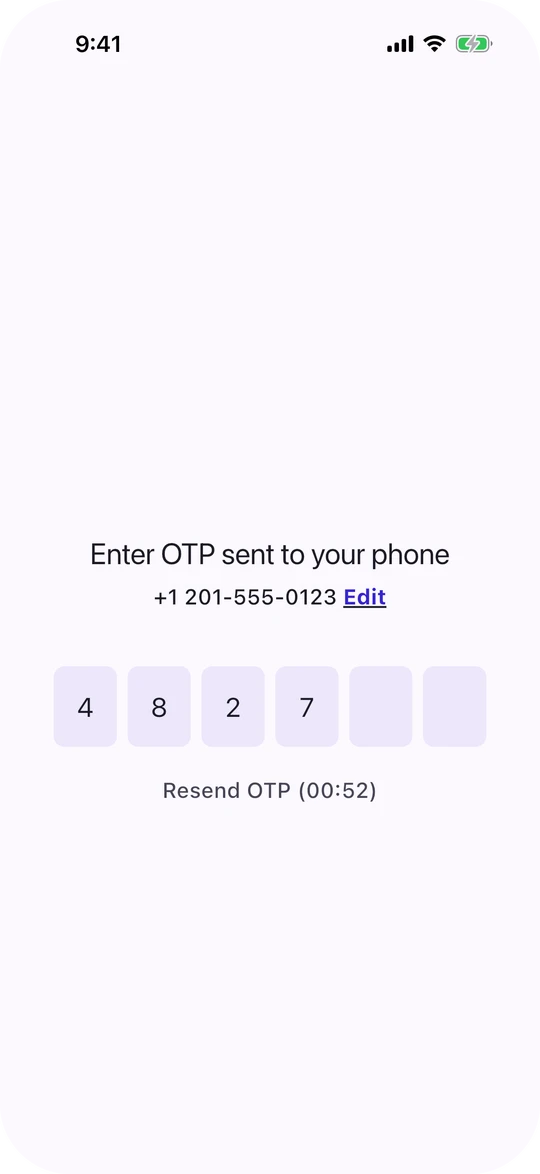 One-time code with resend timer |
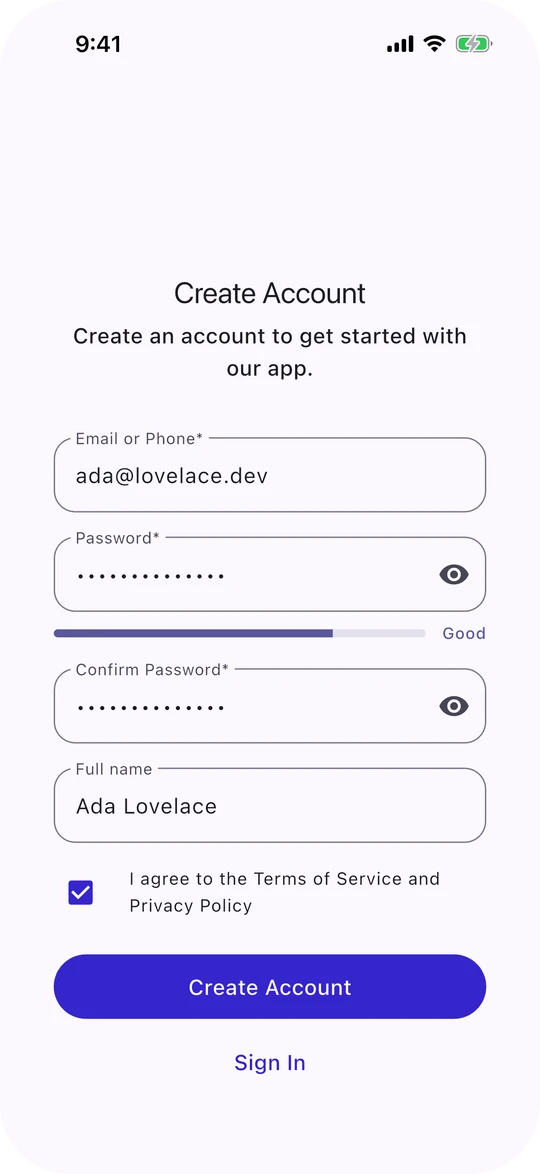 Sign up with extra fields and consent |
 Social providers, brand-styled |
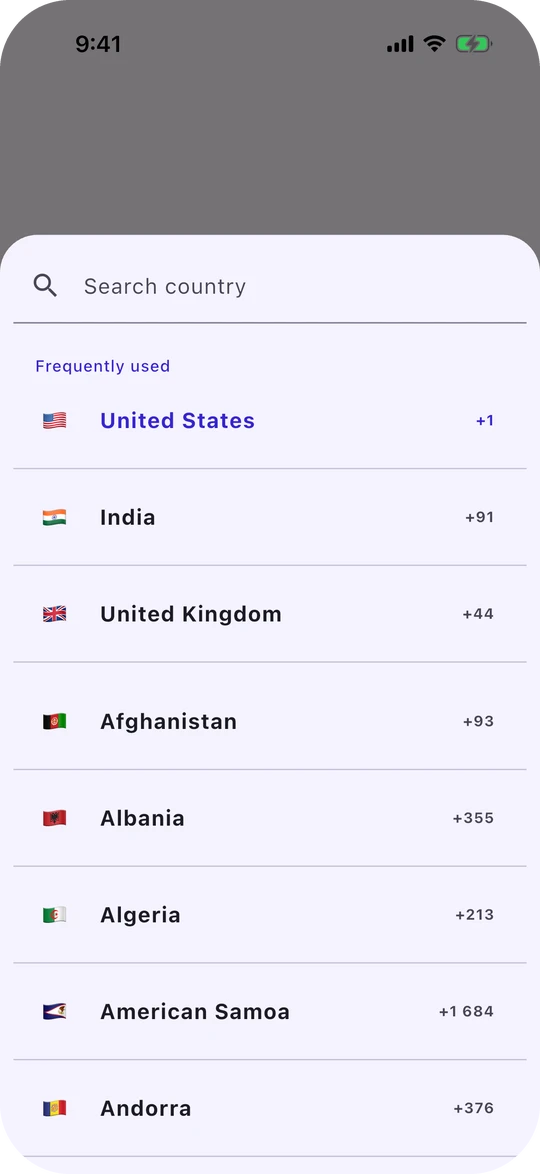 Country picker with favourites |
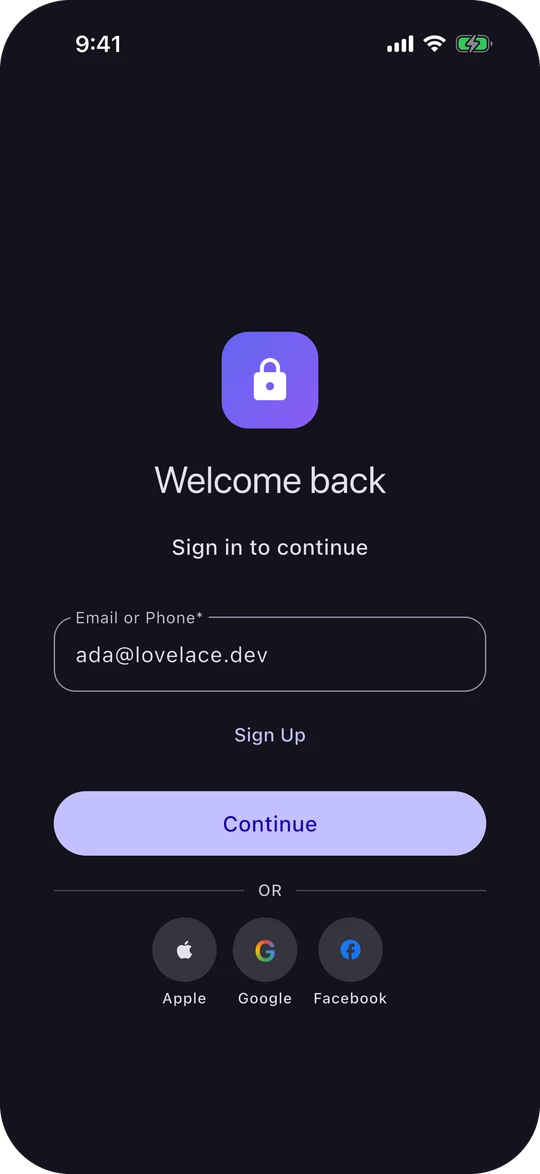 Dark mode |
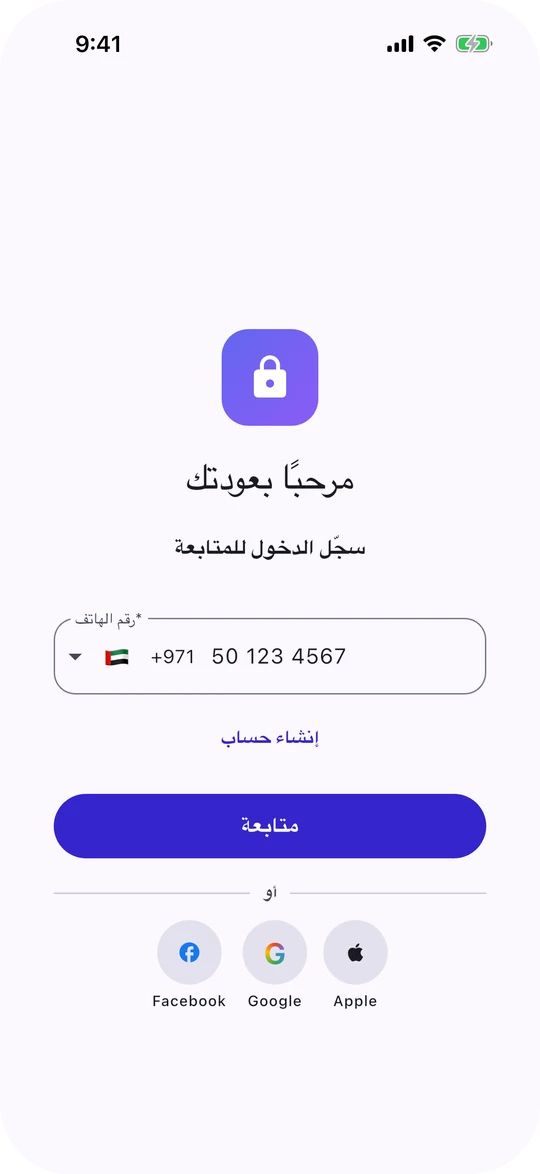 Right-to-left and localized |
 Wide layout on tablet, desktop and web |
Requirements #
| Minimum | |
|---|---|
| Flutter | 3.29 |
| Dart | 3.7 |
| Platforms | Android, iOS, web, macOS, Windows, Linux |
| Native setup | None — the package ships no platform code |
On Flutter 3.27 or 3.28, stay on flutter_animated_login: 0.0.15. (It declares
Flutter 3.10, but needs 3.27.)
Installation #
flutter pub add flutter_animated_login
Everything is available from a single import. It also re-exports
flutter_intl_phone_field
and pinput, so types such as PhoneNumber
and PinTheme need no extra import.
import 'package:flutter_animated_login/flutter_animated_login.dart';
Quick start #
A complete one-time-code sign-in. Replace the AuthApi calls with your backend.
import 'package:flutter/material.dart';
import 'package:flutter_animated_login/flutter_animated_login.dart';

void main() => runApp(const MaterialApp(home: SignInScreen()));

class SignInScreen extends StatelessWidget {
  const SignInScreen({super.key});

  @override
  Widget build(BuildContext context) {
    return FlutterAnimatedLogin(
      // `data.name` is the email as typed, or the phone number in E.164 form.
      // Return null when the code was sent, or a message to show the user.
      onLogin: (data) => AuthApi.sendCode(data.name),
      onResendOtp: (data) => AuthApi.sendCode(data.name),
      onVerify: (data) async {
        final error = await AuthApi.verifyCode(data.name, data.secret!);
        if (error != null) return error;
        if (context.mounted) {
          Navigator.of(context).pushReplacement(
            MaterialPageRoute(builder: (_) => const HomeScreen()),
          );
        }
        return null;
      },
      loginConfig: const LoginConfig(
        title: 'Welcome back',
        subtitle: 'Sign in to continue',
      ),
    );
  }
}
That's the whole flow: the package validates the input, shows a spinner while
your callback runs, moves to the code screen, handles the resend countdown and
displays any error you return. Run example/ to try every feature.
How it works #
The callback contract #
Every callback returns Future<String?>:
| Return | Meaning |
|---|---|
null or '' |
Success — the flow moves on. |
| Any other string | Failure — the message is shown to the user and the flow stays put. |
| Callback | Receives | On success, the package… |
|---|---|---|
onLogin |
LoginData |
…opens the code screen (one-time-code sign-in), or asks the platform to save the credentials and clears the form (password sign-in). |
onVerify |
LoginData with the code in secret |
…returns to a cleared login screen. |
onResendOtp |
LoginData |
…clears the code field, counts the attempt toward maxResendAttempts and restarts the countdown. |
onSignup |
SignupData |
…clears the form and returns to the login screen, without a success message. With SignupConfig.loginAfterSignUp, it keeps what was typed. |
onResetPassword |
the identifier String |
…shows a confirmation, then clears the form and returns to the login screen (turn off with ResetConfig.returnToLoginOnSuccess). |
LoginProvider.callback |
— | …opens the sign-up screen if providerNeedsSignUpCallback resolves true; otherwise nothing further. A message listed in errorsToExcludeFromErrorMessage is hidden and treated as success. |
When sign-in, verification or sign-up succeeds, any error the package showed earlier on that screen is dismissed (a message your own callback shows is left alone). If you navigate away inside the callback, the package leaves its screen as it is rather than resetting it behind your transition.
Important
The package never navigates for you. Move to your home screen from
onVerify (or from onLogin for password sign-in) once your backend says
yes. Catch your own exceptions and return a message: an exception thrown out
of a callback stops the spinner but shows the user nothing.
Login types #
loginType |
Screen shows | LoginData.secret in onLogin |
|---|---|---|
LoginType.otp (default) |
Identifier, then a code screen | null |
LoginType.password |
Identifier and password | the password |
LoginType.otpAndPassword |
Identifier, password, and a “use a code instead” toggle | the password, or null — check data.method |
What you receive #
LoginData carries name (the email, or the phone number in E.164), secret
(the password or code; null when a code is being sent), method
(LoginMethod.otp or LoginMethod.password), the parsed phoneNumber (null
for email) and acceptedTerms.
SignupData is a separate class: name and password (both String?),
additionalSignupData (a non-null map of your extra sign-up fields),
phoneNumber and acceptedTerms.
Both hide the password or code in toString(), but still print the email or
phone number, and SignupData prints additionalSignupData — keep them out of
logs that must not contain personal data.
Recipes #
Wait for an asynchronous code send #
Some SDKs report the result of sending a code through a later callback rather
than the returned Future — Firebase Authentication's verifyPhoneNumber is
the common case. Returning null early would open the code screen before a
code exists, so wait for the outcome:
import 'dart:async'; // Completer

Future<String?> sendCode(LoginData data) {
  final result = Completer<String?>();
  try {
    phoneAuth.verifyPhoneNumber(
      phoneNumber: data.name, // E.164, e.g. +12015550123
      codeSent: (verificationId) {
        if (!result.isCompleted) result.complete(null); // opens the code screen
      },
      verificationFailed: (message) {
        if (!result.isCompleted) result.complete(message); // stays and shows it
      },
    );
  } catch (_) {
    if (!result.isCompleted) result.complete('Could not send the code.');
  }
  // Never leave the button spinning if the SDK goes quiet.
  return result.future.timeout(
    const Duration(seconds: 90),
    onTimeout: () => 'Could not send the code. Please try again.',
  );
}

final login = FlutterAnimatedLogin(
  loginConfig: const LoginConfig(
    loginFieldInputType: LoginFieldInputType.phone,
  ),
  onLogin: sendCode,
  onResendOtp: sendCode,
  onVerify: (data) => phoneAuth.confirm(data.secret!),
);
Drive the flow from your code #
class _SignInState extends State<SignIn> {
  final controller = FlutterAnimatedLoginController(initialCountryCode: 'US');

  @override
  void dispose() {
    controller.dispose(); // you created it, so you dispose it
    super.dispose();
  }

  @override
  Widget build(BuildContext context) => FlutterAnimatedLogin(
        controller: controller,
        onLogin: (data) => AuthApi.sendCode(data.name),
        onStepChanged: (step) => debugPrint('now on ${step.name}'),
      );

  void openedFromDeepLink(String email) => controller.prefill(identifier: email);
  void signedOut() => controller.reset(); // clears fields, country and consent
}
goTo(LoginStep.signup), showOtp(sentTo:), clearOtp() and setBusy() are
there too, and step, identifier, phoneNumber and isFormValid tell you
where the user is. Call showOtp only when a code was sent some other way —
returning null from onLogin already opens the code screen.
Note
A controller you pass owns the form's state. The controller fields of the
LoginConfig and VerifyConfig field configs, and
EmailPhoneTextFieldConfig.initialValue and initialCountryCode, are then
ignored: pass identifierController, passwordController, otpController,
initialIdentifier and initialCountryCode to the controller's constructor
instead.
Extra fields on the sign-up form #
import 'package:flutter/services.dart'; // FilteringTextInputFormatter

final signUp = FlutterAnimatedLogin(
  onSignup: (data) async {
    final fullName = data.additionalSignupData['name']!;
    final age = int.tryParse(data.additionalSignupData['age'] ?? '');
    return AuthApi.register(data.name!, data.password!, fullName, age);
  },
  signupConfig: SignupConfig(
    additionalFields: [
      const SignupField(key: 'name', label: 'Full name', isRequired: true),
      SignupField(
        key: 'age',
        label: 'Age',
        keyboardType: TextInputType.number,
        inputFormatters: [FilteringTextInputFormatter.digitsOnly],
      ),
    ],
    // For anything a text field can't express. Writing to `values` redraws
    // the field and adds the entry to additionalSignupData.
    customFields: [
      (context, values) => SwitchListTile(
            title: const Text('Send me product news'),
            value: values['newsletter'] == 'true',
            onChanged: (on) => values['newsletter'] = '$on',
          ),
    ],
  ),
);
The confirm-password value is not included in additionalSignupData; set
includeConfirmPasswordInData: true if you need it.
Require a strong password #
SignupConfig(
  passwordTextFiledConfig: const PasswordTextFieldConfig(
    policy: PasswordPolicy(
      minLength: 10,
      requireUppercase: true,
      requireDigit: true,
      minStrength: PasswordStrength.good,
    ),
    showStrengthMeter: true,
    showRequirementChecklist: true,
  ),
)
Put the policy on the sign-up screen. On LoginConfig.passwordConfig it would
also apply at sign-in — rejecting passwords created before the policy — and
the sign-up screen inherits it unless overridden. PasswordPolicy.standard()
and PasswordPolicy.strict() are ready-made, and a policy runs before your own
validator, so the two combine.
Terms the user must accept #
FlutterAnimatedLogin(
  consent: ConsentConfig(
    isRequired: true,
    showOnSignup: true, // gate sign-up…
    showOnLogin: false, // …but not sign-in
    label: Wrap(
      children: [
        const Text('I accept the '),
        GestureDetector(
          onTap: openTerms,
          child: const Text(
            'terms of service',
            style: TextStyle(decoration: TextDecoration.underline),
          ),
        ),
      ],
    ),
  ),
  onSignup: (data) async => AuthApi.register(data.name!, data.password!, '', null),
)
Consent disables the primary button only on the screens it is shown on; social
provider buttons are never gated, so check controller.acceptedTerms in a
provider callback if they must be. The answer is reported in
LoginData.acceptedTerms and SignupData.acceptedTerms.
Social sign-in buttons #
FlutterAnimatedLogin(
  loginConfig: const LoginConfig(
    providerLayout: ProviderLayout.fullWidthStacked,
  ),
  providers: [
    LoginProvider(
      icon: Icons.apple,
      label: const Text('Continue with Apple'),
      semanticLabel: 'Sign in with Apple',
      backgroundColor: Colors.black,
      foregroundColor: Colors.white,
      callback: () => AuthApi.signInWithApple(),
    ),
    LoginProvider(
      iconWidget: Image.asset('assets/google.png', height: 20),
      label: const Text('Continue with Google'),
      semanticLabel: 'Sign in with Google',
      backgroundColor: Colors.white,
      foregroundColor: Colors.black87,
      // Hide "the user cancelled" instead of showing it as an error.
      errorsToExcludeFromErrorMessage: const ['sign_in_canceled'],
      callback: () => AuthApi.signInWithGoogle(),
    ),
  ],
)
Use ProviderLayout.iconWrap for compact round buttons that wrap onto new
rows, or button: to supply your own widget entirely. Buttons keep their
backgroundColor and foregroundColor while signing in; if you pass style
(or AnimatedLoginTheme.providerButtonStyle), set its disabled colours
yourself.
Phone-only sign-in with country options #
const LoginConfig(
  loginFieldInputType: LoginFieldInputType.phone,
  textFiledConfig: EmailPhoneTextFieldConfig(
    initialCountryCode: 'GB',
    favoriteCountries: ['GB', 'US', 'IN'],
    formatInput: true, // formats in the selected country's own layout
  ),
)
onlyCountries, excludeCountries, strictValidation, showExampleAsHint
and detectCountryOnPaste are available on the same config.
Tune the one-time-code screen #
VerifyConfig(
  resendCooldown: const Duration(seconds: 30), // match your rate limit
  maxResendAttempts: 3,
  textFiledConfig: const OtpTextFieldConfig(length: 4),
  countdownBuilder: (context, remaining) =>
      Text('Resend in ${remaining.inSeconds}s'),
)
SMS autofill on Android #
The package requests no SMS permissions. Add
smart_auth to your app, implement
pinput's SmsRetriever, and pass it in:
VerifyConfig(
  textFiledConfig: OtpTextFieldConfig(smsRetriever: MySmsRetriever()),
)
Customization #
Translate every string #
LoginConfig(
  messages: FormMessages(
    signIn: l10n.signIn,
    signUp: l10n.createAccount,
    password: l10n.password,
    otpSentToPhone: l10n.codeSentToPhone,
    invalidFormData: l10n.checkTheForm,
  ),
)
FormMessages has a field for each of the 60 strings the package draws,
including the country picker's; anything you leave out stays in English. Text
you pass in yourself — titles, labels, provider names — is yours to translate.
Right-to-left layouts work out of the box, and phone numbers and email
addresses always read left to right, in the form and on the code screen.
Theme it once #
MaterialApp(
  theme: ThemeData(
    colorSchemeSeed: const Color(0xFF4F46E5),
    extensions: const [
      AnimatedLoginTheme(
        cardRadius: BorderRadius.all(Radius.circular(28)),
        fieldRadius: BorderRadius.all(Radius.circular(12)),
        fieldGap: 20,
        maxCardWidth: 520,
        pageTransitionDuration: Duration(milliseconds: 400),
      ),
    ],
  ),
  home: const SignInScreen(),
)
Precedence, highest first: a field on a specific config (for example
PageConfig.cardPadding), then FlutterAnimatedLogin.theme, then the
AnimatedLoginTheme on your ThemeData, then defaults derived from your
ColorScheme. Three theme fields are exceptions, because they replace a whole
button style: primaryButtonStyle (ignoring LoginConfig.buttonTextStyle),
secondaryButtonStyle (ignoring every screen's buttonTextStyle on its links)
and providerButtonStyle (ignoring each provider's colours).
Inside your own Scaffold #
The widget provides a Scaffold by default. If you already have one, turn it
off to avoid a second background:
Scaffold(
  appBar: AppBar(title: const Text('Sign in')),
  body: const FlutterAnimatedLogin(
    config: PageConfig(useScaffold: false),
  ),
)
Using with AI assistants #
AI coding assistants mostly learned this package from 0.0.x, or never saw it. Left alone, they write code that no longer compiles against 1.0.0 — or worse, code that compiles and quietly breaks the flow, such as returning from onLogin before a code has actually been sent. The rules and prompts below were checked against the 1.0.0 source, and every prompt was run by an assistant on a fresh app that then had to pass flutter analyze and a widget test.
Give your assistant the rules #
Paste this block before any prompt, or keep it in your project's AGENTS.md, CLAUDE.md, .cursor/rules or .github/copilot-instructions.md.
flutter_animated_login 1.0 — rules for generating code

SETUP
- Depend on flutter_animated_login: ^1.0.0. The installed toolchain must be Flutter >=3.29 (Dart
  >=3.7). Pure Dart: no platform setup on any target.
- Import only package:flutter_animated_login/flutter_animated_login.dart for this package. It
  re-exports flutter_intl_phone_field 0.1.x (PhoneNumber, Country) and pinput 6.x (PinTheme,
  SmsRetriever). Never import package:flutter_animated_login/src/..., and don't add signals.
  Flutter's own libraries are fine.

CALLBACKS (onLogin, onVerify, onResendOtp, onSignup, onResetPassword, LoginProvider.callback)
- Return Future<String?>: null or '' = success; a non-empty String = failure, shown in a SnackBar
  (needs a ScaffoldMessenger above; MaterialApp has one).
- Wrap the whole body in try/catch and return a short user-facing message, never e.toString(). An
  exception that escapes shows the user nothing.
- Return only when the backend has finished. For SDKs that report through later callbacks (Firebase
  verifyPhoneNumber: codeSent / verificationFailed), await a Completer<String?> completed there,
  with a timeout. Returning null early opens the code screen before a code exists.
- onResetPassword receives the identifier String. LoginProvider.callback takes no arguments.

AFTER SUCCESS the package never navigates and never signs anyone in.
- Navigate yourself, then return null. Check context.mounted after every await. Replace the login
  route (Navigator.pushReplacement, go_router context.go) and don't await the push. If your router
  redirects on auth state, just return null. If you navigate inside the callback, the package leaves
  its screen as it is; on success it also dismisses its own earlier error SnackBar.
- LoginType.otp (default): onLogin null -> the package opens the code screen itself. Never call
  controller.showOtp() in onLogin. onVerify null -> back to a cleared login screen.
- LoginType.password: onLogin null -> the platform is asked to save the credentials and the form
  clears.
- LoginType.otpAndPassword: password field plus a toggle; branch on data.method.
- onSignup null -> back to login (fields kept if SignupConfig.loginAfterSignUp). No success message
  is shown.
- onResetPassword null -> a confirmation SnackBar, then back to login.

DATA
- LoginData: name (email as typed, trimmed, or phone in E.164 like +919876543210), secret (password
  or code; null when sending a code), method (LoginMethod.otp or .password; .provider is never
  sent), phoneNumber (PhoneNumber?, null for email), acceptedTerms.
- In onVerify and onResendOtp, name is the identifier from the form. showOtp(sentTo:) sets the code
  screen's subtitle and email/phone wording, and is used as name only when no identifier was
  entered.
- SignupConfig.customFields builders receive a map: writing to it redraws the field and adds the
  entry to additionalSignupData. A custom FormField must also call field.didChange(...) so its
  validator sees the new value.
- SignupData: name and password are String?; additionalSignupData is a non-null Map<String, String>
  keyed by SignupField.key, without 'confirmPassword' (the form already checks the passwords match).

CONTROLLER (FlutterAnimatedLoginController, optional)
- Created and disposed internally if omitted. One you pass is yours to dispose, as is every
  TextEditingController you pass. One controller per FlutterAnimatedLogin.
- goTo(LoginStep.login/verify/signup/resetPassword), showOtp({sentTo}), reset(),
  prefill({identifier, countryIsoCode, password, additionalFields}), setBusy, clearOtp; read step,
  identifier, phoneNumber, isPhone, isFormValid. The widget also has onStepChanged.
- reset() returns to login, clears fields, unticks consent (ConsentConfig.initialValue is not
  re-applied) and restores the controller's initialCountryCode. It does not reset the otpAndPassword
  toggle.
- The controller owns field state. With one you pass, the controller:, initialValue and
  initialCountryCode fields of the configs are ignored; give text controllers, initialIdentifier and
  initialCountryCode to its constructor. The controller: fields of SignupConfig and ResetConfig
  configs are never read.

NAMES
- Correctly spelled class aliases exist: EmailPhoneTextFieldConfig, PasswordTextFieldConfig,
  OtpTextFieldConfig.
- Parameter names keep a typo: textFiledConfig (on LoginConfig, VerifyConfig, SignupConfig,
  ResetConfig) and SignupConfig.passwordTextFiledConfig. LoginConfig's password config is
  passwordConfig.
- VerifyConfig(textFiledConfig: OtpTextFieldConfig(length: 6), resendCooldown: Duration(seconds:
  60)) — resendCooldown is a Duration.

UI
- FlutterAnimatedLogin draws its own Scaffold; return it straight from build(). Inside an existing
  Scaffold pass config: PageConfig(useScaffold: false), with bounded height (it scrolls itself).
- "Sign Up" shows when onSignup is set, "Forgot Password?" when onResetPassword is set, for every
  login type; override with LoginConfig(showSignupLink:, showForgotLink:).
- loginFieldInputType: phone / email / phoneOrEmail (default). Default country is 'IN'; set
  EmailPhoneTextFieldConfig(initialCountryCode:).
- ConsentConfig(label:, isRequired:, showOnLogin: false, showOnSignup: true) disables the primary
  button only on screens where it is shown. Social provider buttons are never gated; check
  controller.acceptedTerms in their callbacks if they must be.
- PasswordPolicy defaults minLength to 8 — pass it explicitly. Put policies on the signup password
  field, not the login one.
- Strings: LoginConfig(messages: FormMessages(...)) covers every string the package draws. Theme:
  AnimatedLoginTheme in ThemeData.extensions, or FlutterAnimatedLogin(theme:). Config fields beat
  the theme, except that a theme primaryButtonStyle, secondaryButtonStyle or providerButtonStyle
  replaces those buttons' whole style (including config buttonTextStyle and provider colours).
- Pin themes don't merge: if you set OtpTextFieldConfig.defaultPinTheme, also set focusedPinTheme
  and errorPinTheme (derive them with copyWith).

AVOID (0.0.x habits)
- additionalSignupData?[...] and ['confirmPassword']; FlutterAnimatedLogin(debug:); signals imports
  or the old globals (nextPageNotifier, usernameNotifier…);
  package:flutter_intl_phone_field/phone_number.dart; building FlutterAnimatedVerify/Signup/Reset
  directly; data.secret.isEmpty when sending a code (it is null). Deprecated but still compiling:
  LoginConfig.termsAndConditions/privacyPolicy strings (never displayed),
  EmailPhoneTextFieldConfig.searchText (use FormMessages.searchCountry),
  PasswordTextFieldConfig(scribbleEnabled:) (use stylusHandwritingEnabled).
An assistant can also read the raw README, MIGRATION.md or the API reference. Inside your project, the installed copies are listed in .dart_tool/package_config.json.
Copy-paste prompts #
Replace every <PLACEHOLDER> before sending. Each prompt ends by running the analyzer and the tests, because a login flow can pass flutter analyze and still be wrong.
Quick start: OTP login — Add a phone or email one-time-code login to an existing app with your own backend.
Add a one-time-code login screen to this Flutter app with the flutter_animated_login package.
1. Run flutter --version. The installed Flutter must be 3.29 or newer (Dart 3.7); if it isn't, stop
   and tell me. The project's own environment lower bound does not need to change. Add
   flutter_animated_login: ^1.0.0 to pubspec.yaml and run flutter pub get. It is pure Dart, so there
   is no platform setup.
2. For this package, its phone-field types and pinput types, import only
   package:flutter_animated_login/flutter_animated_login.dart (it re-exports
   flutter_intl_phone_field and pinput). Don't add those two packages or signals to pubspec.yaml.
   Flutter's own imports are fine.
3. Use <AUTH_REPOSITORY> with Future<void> sendOtp(String identifier) and Future<void>
   verifyOtp(String identifier, String code). If it does not exist, create that interface plus a
   fake implementation I will replace. Document on the interface, and honour in the fake, that
   sendOtp completes only once the backend has accepted the send and throws if it failed, and that
   verifyOtp throws on a wrong code. Add to that doc comment: an implementation over a
   callback-style SDK (for example Firebase verifyPhoneNumber) must complete a Completer from the
   SDK's codeSent / verificationFailed callbacks, not return the SDK call's own Future.
4. Create <LOGIN_SCREEN> whose build() returns FlutterAnimatedLogin directly, with loginType
   LoginType.otp. It draws its own Scaffold, so don't wrap it in another. Show it in place of
   <CURRENT_ENTRY_ROUTE> to users that <SESSION_CHECK> reports as signed out; if the app has no
   session concept yet, make it the initial screen.
5. Identifier: set LoginConfig.loginFieldInputType to
   LoginFieldInputType.<phone|email|phoneOrEmail>. For phone input also set
   LoginConfig.textFiledConfig (the parameter really is spelled "Filed") to
   EmailPhoneTextFieldConfig(initialCountryCode: '<ISO_COUNTRY_CODE>'); the default is 'IN'.
6. Callback contract: every callback returns Future<String?>. null means success; a non-empty String
   is an error message the package shows in a SnackBar, which needs a ScaffoldMessenger above the
   screen (MaterialApp provides one). Wrap each callback's whole body in try/catch and return a
   short user-facing message, never e.toString(); an exception that escapes a callback is shown to
   nobody. After every await, check context.mounted before using context.
7. onLogin: await sendOtp(data.name) and return null only after it completes. data.name is the email
   as typed (trimmed) or the phone number in E.164 form (+14155550123); data.secret is null here. On
   null the package opens the code screen itself, so don't call controller.showOtp() and don't push
   a route.
8. onVerify: await verifyOtp(data.name, data.secret!). The package does not navigate. If
   context.mounted, replace the current route with <HOME_SCREEN> using <NAVIGATION_API> (don't await
   the push: its Future completes only when that route pops), then return null. If the app's router
   already redirects on auth state, skip the navigation and just return null.
9. onResendOtp: await sendOtp(data.name) again and return null; data.secret is null there.
10. Pass verifyConfig: VerifyConfig(textFiledConfig: OtpTextFieldConfig(length: <OTP_LENGTH>),
    resendCooldown: Duration(seconds: <BACKEND_RESEND_INTERVAL_SECONDS>)). This parameter is also
    spelled textFiledConfig.
11. Leave out onSignup and onResetPassword: passing either adds a Sign Up or Forgot Password link,
    in OTP mode too.
12. If the screen must sit inside an existing Scaffold, pass config: PageConfig(useScaffold: false)
    and keep its height bounded (no ListView, SingleChildScrollView or unbounded Column around it).
    Only create a FlutterAnimatedLoginController if needed, and dispose it in the State that owns
    it.
Finally, run flutter analyze and flutter test and fix everything they report, updating existing
tests that expected <CURRENT_ENTRY_ROUTE> as the first screen.
Firebase phone sign-in — Sign users in with Firebase Authentication phone numbers, with correct async handling, resend and Android auto-retrieval.
Implement Firebase Authentication phone-number sign-in in this Flutter app, using the
flutter_animated_login package for the UI.
- Add flutter_animated_login: ^1.0.0 (the installed Flutter must be >=3.29, Dart >=3.7),
  firebase_core and firebase_auth. From flutter_animated_login import only
  package:flutter_animated_login/flutter_animated_login.dart; Flutter's own imports are fine.
- Setup: if main() does not already call Firebase.initializeApp(options:
  DefaultFirebaseOptions.currentPlatform) after WidgetsFlutterBinding.ensureInitialized(), add it.
  If lib/firebase_options.dart does not exist, stop and tell me to run flutterfire configure; don't
  write it yourself. List, don't perform, the console steps, and tell me to confirm them against the
  current Firebase docs: enable the Phone provider, add the Android SHA-1 and SHA-256 fingerprints,
  configure iOS APNs and the reCAPTCHA URL scheme.
- Platforms: verifyPhoneNumber works on Android and iOS, and on web through an invisible reCAPTCHA
  (no resend token and no verificationCompleted there). On macOS it fails with UnimplementedError.
  If the app targets desktop, tell me.
- Build a StatefulWidget <PHONE_LOGIN_SCREEN> with an optional FirebaseAuth? auth constructor
  parameter that defaults to FirebaseAuth.instance, so a widget test can pass a fake. Its build()
  returns FlutterAnimatedLogin directly (it draws its own Scaffold) with loginType: LoginType.otp,
  loginConfig: LoginConfig(loginFieldInputType: LoginFieldInputType.phone, textFiledConfig:
  EmailPhoneTextFieldConfig(initialCountryCode: '<ISO_COUNTRY_CODE>')), and verifyConfig:
  VerifyConfig(textFiledConfig: OtpTextFieldConfig(length: 6), resendCooldown: Duration(seconds:
  60)). Both parameters really are spelled textFiledConfig. The State keeps String? _verificationId,
  int? _resendToken, int _request = 0 and bool _signedIn = false.
- Package contract: callbacks return Future<String?>; null = success, a non-empty String = error
  shown in a SnackBar. Catch FirebaseAuthException and map e.code to <FRIENDLY_MESSAGES> (for
  example invalid-phone-number, too-many-requests, invalid-verification-code, session-expired, plus
  a default branch for any other code). Catch every other exception as well. Never return
  e.toString() and never let an exception escape. The package never navigates.
- Critical: the moment onLogin returns null, the package opens the code screen. On Android and iOS,
  verifyPhoneNumber's Future completes before codeSent or verificationFailed fires, so onLogin must
  wait for those callbacks.
- Write Future<String?> _sendCode(String phone, {int? resendToken}):
  1. Increment _request, keep its value as id, and create a Completer<String?>. Guard every
     complete() with isCompleted.
  2. Every callback first returns if id != _request, so callbacks from an earlier send (the user
     tapped Edit or Back and entered another number) are ignored.
  3. codeSent: store the verificationId and resend token, then complete with null.
     verificationFailed: complete with the mapped message. codeAutoRetrievalTimeout: nothing more to
     do; codeSent already stored the id.
  4. verificationCompleted (Android auto-retrieval or instant verification): in try/catch, await
     signInWithCredential with the credential it provides, run the shared success step, and then
     complete the Completer with null if it is still pending. On failure, complete the Completer
     with the mapped message if it is still pending; otherwise the user is already on the code
     screen, so show the message with ScaffoldMessenger.maybeOf(context).
  5. Inside try, await auth.verifyPhoneNumber(phoneNumber: phone, forceResendingToken: resendToken,
     timeout: Duration(seconds: 60), plus the callbacks). Its errors, including UnimplementedError
     on macOS, arrive as a failed Future; in catch, complete the Completer with a message.
  6. Return completer.future.timeout(Duration(seconds: 90), onTimeout: () => <TIMEOUT_MESSAGE>) so
     the button can never spin forever.
- onLogin: return _sendCode(data.name). data.name is already E.164 (+14155550123); data.phoneNumber
  holds the parsed number.
- onVerify: if _verificationId is null, return an error message. Otherwise, in try/catch, await
  signInWithCredential(PhoneAuthProvider.credential(verificationId: _verificationId!, smsCode:
  data.secret!)), run the shared success step, and return null.
- onResendOtp: return _sendCode(data.name, resendToken: _resendToken).
- Shared success step: if _signedIn is already true, return; otherwise set it. Then, if
  context.mounted, replace the route with <HOME_ROUTE> using <NAVIGATION_API> (pushReplacement or
  go, never push, and don't await it). If the app's router already redirects on auth state, skip the
  navigation.
- Don't call controller.showOtp() yourself. Don't pass onSignup or onResetPassword; they add Sign Up
  and Forgot Password links.
Finally, run flutter analyze and flutter test and fix everything they report. Add a widget test with
a fake FirebaseAuth that captures the verifyPhoneNumber callbacks, and check that the code screen
appears only after codeSent fires.
Supabase email code sign-in — Sign in with a Supabase email one-time code and sign up with email, password and a full-name field.
Add Supabase email authentication to this Flutter app with the flutter_animated_login package for
the UI: a one-time code to sign in, and email plus password to sign up.
- Add flutter_animated_login: ^1.0.0 (the installed Flutter must be >=3.29, Dart >=3.7) and
  supabase_flutter. Import package:flutter_animated_login/flutter_animated_login.dart and
  package:supabase_flutter/supabase_flutter.dart. Recent supabase_flutter releases need a newer
  Flutter than 3.29; on an older toolchain pub resolves an older release.
- If main() does not call Supabase.initialize, add it with url <SUPABASE_URL> and publishableKey
  <SUPABASE_PUBLISHABLE_OR_ANON_KEY> read from <CONFIG_SOURCE>, never hardcoded. If the resolved
  supabase_flutter is older than 2.13, the parameter is anonKey instead.
- Tell me, without doing it, to check these dashboard settings against the current Supabase docs:
  add {{ .Token }} to the Magic Link and Confirm signup email templates so the emails contain a
  code; note the project's Email OTP length, email rate limit and minimum password length; and set
  Site URL and redirect URLs to <CONFIRM_REDIRECT_URL> if signup keeps link-based confirmation.
- Put the screen in its own widget with an optional GoTrueClient? auth parameter that defaults to
  Supabase.instance.client.auth, so tests can pass a fake. Its build() returns FlutterAnimatedLogin
  directly (it draws its own Scaffold) with loginType LoginType.otp,
  LoginConfig(loginFieldInputType: LoginFieldInputType.email), and VerifyConfig(textFiledConfig:
  OtpTextFieldConfig(length: <OTP_LENGTH>), resendCooldown: Duration(seconds:
  <EMAIL_RATE_LIMIT_SECONDS>)). Match those two values to the project's settings (commonly 6 digits
  and 60 seconds). The parameter really is spelled textFiledConfig.
- Contract: every callback returns Future<String?>; null = success, a non-empty String = error shown
  in a SnackBar. Catch AuthException (return <FRIENDLY_MESSAGE> or its message) and any other
  exception; never throw. After every await, check context.mounted before touching context
  (Navigator, ScaffoldMessenger); if it is false, return null. The package never navigates.
- onLogin: await auth.signInWithOtp(email: data.name, shouldCreateUser: false), then return null.
  The package opens the code screen by itself; don't call controller.showOtp(). An address with no
  account makes signInWithOtp throw an AuthException, which Supabase Auth currently reports with
  code 'otp_disabled' ("Signups not allowed for otp"). For that code return <NO_ACCOUNT_MESSAGE>,
  telling the user to tap Sign Up.
- onVerify: await auth.verifyOTP(type: OtpType.email, email: data.name, token: data.secret!). If the
  response has no session, return an error. Otherwise replace the login route with <HOME_ROUTE>
  using the app's router (Navigator.pushReplacementNamed or go_router's context.go; don't await it)
  and return null.
- onResendOtp: call signInWithOtp again with the same arguments.
- onSignup: data.name and data.password are String?, and additionalSignupData lookups return
  String?. Call auth.signUp(email: data.name!, password: data.password!, data: {'full_name':
  data.additionalSignupData['full_name'] ?? ''}). additionalSignupData itself is a non-null
  Map<String, String>: don't use ?. on it, and don't look for 'confirmPassword' (the form already
  checks that the passwords match).
- Signup success does not sign anyone in; the package shows no message and just returns to the login
  step. If the signUp response has a session, replace the route with <HOME_ROUTE>. If it has no
  session and response.user?.identities is empty, the email is already registered: return
  <ALREADY_REGISTERED_MESSAGE>. Otherwise email confirmation is on: show <CHECK_INBOX_MESSAGE> with
  ScaffoldMessenger.of(context).showSnackBar, then return null.
- Pass signupConfig: SignupConfig(additionalFields: [SignupField(key: 'full_name', label:
  '<FULL_NAME_LABEL>', isRequired: true, textCapitalization: TextCapitalization.words)],
  passwordTextFiledConfig: PasswordTextFieldConfig(policy: PasswordPolicy(minLength:
  <SUPABASE_MIN_PASSWORD_LENGTH>), showStrengthMeter: true)). The parameter is spelled "Filed".
  Always pass minLength: Supabase's default minimum is 6, while PasswordPolicy's own default is 8.
- Passing onSignup is what shows the Sign Up link. Don't pass onResetPassword unless I ask. If the
  widget must sit inside an existing Scaffold, add config: PageConfig(useScaffold: false).
Finally, run flutter analyze and flutter test and fix everything they report.
Email and password with your own REST API — Password login, signup with extra fields, a password policy, forgot-password and terms, all against your own backend.
Build email and password authentication for this Flutter app against our REST API, using the
flutter_animated_login package for the UI.
- Add flutter_animated_login: ^1.0.0 (the installed Flutter must be >=3.29, Dart >=3.7) and
  url_launcher. From flutter_animated_login import only
  package:flutter_animated_login/flutter_animated_login.dart; Flutter's own libraries, such as
  package:flutter/gestures.dart for TapGestureRecognizer, are fine. Use <HTTP_CLIENT> for requests
  and <TOKEN_STORAGE> for the session token.
- Contract: every callback returns Future<String?>; null = success, a non-empty String = error shown
  in a SnackBar. Wrap each callback's entire body (the request, JSON decoding and the
  <TOKEN_STORAGE> write) in try/catch and return <FRIENDLY_MESSAGE>, never e.toString(); an
  exception that escapes a callback is never shown to the user. After every await, check
  context.mounted before touching context. The package never navigates.
- Make the screen a StatefulWidget whose build() returns FlutterAnimatedLogin directly (it draws its
  own Scaffold; inside an existing Scaffold pass config: PageConfig(useScaffold: false)), with
  loginType LoginType.password and LoginConfig(loginFieldInputType: LoginFieldInputType.email).
  Create a FlutterAnimatedLoginController in its State, pass it as controller, and dispose it in
  that State.
- onLogin: POST <LOGIN_ENDPOINT> with data.name (the email) and data.secret! (the password). On a
  2xx whose body carries a token, store it; then, if context.mounted, replace the route with
  <HOME_ROUTE> (Navigator.pushReplacementNamed or context.go; don't await it) and return null. Treat
  a 2xx without a token, and any 5xx, as a failure (<FRIENDLY_MESSAGE>). On 401 or another 4xx,
  return the server's message or <INVALID_CREDENTIALS_MESSAGE>.
- onSignup: POST <SIGNUP_ENDPOINT> with data.name!, data.password!,
  data.additionalSignupData['full_name'], data.additionalSignupData['date_of_birth'] (both lookups
  are String?; use ?? '' after validation) and acceptedTerms. additionalSignupData is a non-null
  Map<String, String> with no 'confirmPassword'; the form already rejects mismatched passwords, so
  don't compare them yourself.
- Signup success does not sign anyone in, and the package shows no success message. <EITHER sign in
  with the returned token and navigate as in onLogin, OR show <ACCOUNT_CREATED_MESSAGE> with
  ScaffoldMessenger and return null so the user signs in>. For the second option set
  SignupConfig(loginAfterSignUp: true) so the typed email and password stay on the login screen;
  otherwise the form is cleared.
- Full name: add SignupField(key: 'full_name', label: '<FULL_NAME_LABEL>', isRequired: true) to
  SignupConfig.additionalFields.
- Date of birth: add one builder to SignupConfig.customFields that returns a FormField<String>, so
  it takes part in the signup form's validation. Seed its initialValue from
  controller.additionalFieldValues['date_of_birth']. It opens showDatePicker and shows the chosen
  date and field.errorText in an InputDecorator. When a date is picked, format it as yyyy-MM-dd and
  call BOTH field.didChange(formatted) (the validator only sees the FormField's own value) AND
  controller.setCustomValue('date_of_birth', formatted) (that value reaches additionalSignupData and
  repaints the control). The validator requires a date at least <MIN_AGE> years ago.
- Password policy, signup only: SignupConfig(passwordTextFiledConfig:
  PasswordTextFieldConfig(policy: PasswordPolicy(minLength: <SERVER_MIN_LENGTH>,
  <OTHER_SERVER_RULES, e.g. requireUppercase: true, requireDigit: true>), showStrengthMeter: true,
  showRequirementChecklist: true)). The parameter is spelled "Filed". Always pass minLength, because
  PasswordPolicy defaults it to 8. Leave LoginConfig.passwordConfig without a policy so older
  passwords still pass at login.
- Forgot password: onResetPassword receives a String (the email), not LoginData. POST
  <RESET_ENDPOINT> and return null on any 2xx (no token is expected); return <FRIENDLY_MESSAGE> on
  5xx. The package then shows FormMessages.resetLinkSent and returns to login. Passing onSignup and
  onResetPassword is what shows the Sign Up and Forgot Password links.
- Show this screen in place of <CURRENT_ENTRY_ROUTE> to users <SESSION_CHECK> reports as signed out
  (or make it the initial route), and make sure <HOME_ROUTE> is registered (MaterialApp.routes,
  onGenerateRoute or a GoRoute) before navigating to it. Take <HTTP_CLIENT> and <TOKEN_STORAGE> as
  constructor parameters so a test can pass fakes.
- Terms: pass consent: ConsentConfig(label: ..., isRequired: true, showOnSignup: true, showOnLogin:
  false). It gates only the signup screen. Build the label with Text.rich and a TapGestureRecognizer
  that opens <TERMS_URL> with url_launcher's launchUrl; create the recognizer in State and dispose
  it.
Finally, run flutter analyze and flutter test and fix everything they report.
go_router integration — Put the login flow behind a go_router auth redirect and reset it cleanly on sign-out.
Integrate the flutter_animated_login package with go_router in this Flutter app.
- Add flutter_animated_login: ^1.0.0 (the installed Flutter must be >=3.29, Dart >=3.7), and
  go_router if it is missing. From flutter_animated_login import only
  package:flutter_animated_login/flutter_animated_login.dart.
- Auth state comes from <AUTH_SERVICE>, a ChangeNotifier (wrap a stream in one if needed). Its bool
  isSignedIn must read the SDK's current session synchronously (for example currentUser != null),
  not a value cached from the last stream event, so it is already true when the sign-in call
  returns.
- Keep the GoRouter and one FlutterAnimatedLoginController in the same long-lived owner:
  <LONG_LIVED_OWNER, e.g. fields of the root app State, with the router as a late final field so its
  builders can use the controller, or the DI container>. Never create the router inside build.
  Dispose both there (router.dispose(), controller.dispose()); the package never disposes a
  controller it did not create. Pass the controller to <LOGIN_SCREEN> and to wherever
  <SIGN_OUT_ACTION> runs. Never mount two FlutterAnimatedLogin widgets with the same controller at
  once.
- Replace MaterialApp(home:) with MaterialApp.router(routerConfig: <router>). Give the GoRouter
  refreshListenable: <AUTH_SERVICE> and a redirect: if signed out and state.matchedLocation is not
  '/login', return '/login'; if signed in and on '/login', return '/home'; otherwise return null.
  Keep the existing routes and add GoRoute '/login' building <LOGIN_SCREEN> and '/home' building
  <HOME_SCREEN>. If no existing route matches '/', set initialLocation: '/home' or redirect '/' to
  '/home'.
- For phone input, set the default country on the controller only:
  FlutterAnimatedLoginController(initialCountryCode: '<ISO_COUNTRY_CODE>'); the default is 'IN'. A
  controller you pass ignores EmailPhoneTextFieldConfig.initialCountryCode, so don't set it there.
- In <LOGIN_SCREEN>, build() returns FlutterAnimatedLogin directly (it draws its own Scaffold) with
  the controller, loginType LoginType.<otp|password> and LoginConfig.loginFieldInputType
  LoginFieldInputType.<phone|email|phoneOrEmail>. Every callback returns Future<String?>: null =
  success, a non-empty String = error shown in a SnackBar. Catch every exception and return a
  user-facing message.
- OTP: onLogin awaits <SEND_CODE_CALL>(data.name) and returns null only once the code has actually
  been sent; the package then opens the code screen itself, so don't call controller.showOtp() or
  push a route. data.name is the email as typed or the phone in E.164 (+15551234567); data.secret is
  null on this leg. If <SEND_CODE_CALL> reports through callbacks (e.g. Firebase verifyPhoneNumber's
  codeSent / verificationFailed), await a Completer<String?> completed with null from codeSent
  (store the verificationId for onVerify) or with the message from verificationFailed. onResendOtp
  repeats the send.
- onVerify: await <VERIFY_CALL>(data.name or your saved verificationId, data.secret!) and return
  null. The redirect moves /login to /home once <AUTH_SERVICE> notifies; calling context.go('/home')
  as well (if context.mounted) is harmless but optional. Use go, never push. The package never
  navigates.
- For LoginType.password, do the same inside onLogin: data.secret! is the password.
- Sign-out: in <SIGN_OUT_ACTION>, call controller.reset() first. It returns to the login step,
  clears the typed fields and the consent tick, and restores the controller's initialCountryCode.
  Then call <AUTH_SERVICE>.signOut(). The redirect shows /login; don't also navigate there by hand.
- Back button: FlutterAnimatedLogin's handleBackNavigation (default true) already sends system back
  from the code, signup and reset steps to the login step, and lets /login pop normally. Don't wrap
  it in another PopScope.
- If /login is built inside a ShellRoute that already provides a Scaffold, pass config:
  PageConfig(useScaffold: false).
Finally, run flutter analyze and flutter test. Update tests that pump the app root so they use a
fake <AUTH_SERVICE> (signed in, or expecting /login), then fix everything reported.
Localization and RTL — Translate every package string with gen-l10n, including Arabic right-to-left layout and the country picker.
Localize the flutter_animated_login screens in this app with Flutter's gen-l10n, including Arabic
with right-to-left layout.
- This assumes FlutterAnimatedLogin is already integrated. Don't change what the callbacks do; only
  swap the messages they return for l10n lookups.
- The installed Flutter must be >=3.29 (Dart >=3.7). If gen-l10n isn't set up: add
  flutter_localizations (sdk: flutter) and intl, set generate: true under flutter: in pubspec.yaml,
  and add l10n.yaml with arb-dir: lib/l10n, template-arb-file: app_en.arb, nullable-getter: false
  and preferred-supported-locales: [en]. Without preferred-supported-locales, gen-l10n sorts 'ar'
  first and every unsupported device language falls back to Arabic RTL. Create the ARB files before
  running flutter pub get. Import AppLocalizations from where gen-l10n writes it: inside lib/l10n
  when synthetic-package is off (the default on recent Flutter), or
  package:flutter_gen/gen_l10n/app_localizations.dart on older setups.
- MaterialApp: set localizationsDelegates to AppLocalizations.localizationsDelegates and
  supportedLocales to AppLocalizations.supportedLocales. Don't add a manual Directionality; the
  locale drives RTL.
- Every string the package draws is one of the 60 named String parameters of FormMessages, including
  the country picker's. Open the class and add one ARB key per parameter to app_en.arb (copy the
  English defaults from its constructor) and to app_ar.arb (<ARABIC_TRANSLATIONS, or draft them and
  flag them for review>). Use a lowerCamelCase prefix such as animatedLogin (animatedLoginSignIn,
  animatedLoginResendOTP), because ARB keys become Dart getter names. Don't guess parameter names.
- Write FormMessages formMessagesFrom(AppLocalizations l10n) that passes all 60 parameters. Call it
  inside the build method of the widget that renders FlutterAnimatedLogin, below MaterialApp, and
  pass the result as LoginConfig.messages. LoginConfig can't be const there.
- Keep the literal tokens the package substitutes at runtime: {min} in passwordTooShort, {max} in
  passwordTooLong, {label} in fieldRequired and {country} in countrySelectorLabel. In the ARB,
  declare each as a String placeholder and pass the strings '{min}', '{max}', '{label}' and
  '{country}' when building FormMessages. Plural forms aren't possible this way, so word the
  password messages so the noun doesn't have to agree with the number, and flag them for review.
- Phone field: the country picker's search hint, "No countries found" message and "Frequently used"
  heading, the digits-only error and the country selector's screen-reader label come from
  FormMessages (searchCountry, noCountriesFound, favoriteCountries, digitsOnly,
  countrySelectorLabel). Also set LoginConfig.textFiledConfig (spelled "Filed") to an
  EmailPhoneTextFieldConfig whose languageCode is Localizations.localeOf(context).languageCode, so
  country names are translated. If SignupConfig.textFiledConfig or ResetConfig.textFiledConfig is
  set, give it the same languageCode. Don't use the deprecated searchText.
- Also localize every string or widget the app itself passes into the package, since each one
  replaces a FormMessages default: LoginConfig title, subtitle and buttonText; VerifyConfig title,
  subtitle, resendButton and any countdownBuilder text; SignupConfig and ResetConfig title and
  subtitle, and ResetConfig buttonText; OtpTextFieldConfig semanticLabel and errorText;
  PasswordTextFieldConfig semanticLabel; EmailPhoneTextFieldConfig invalidMessage; any
  InputDecoration passed as EmailPhoneTextFieldConfig decoration or emailDecoration or as
  SignupField decoration (these replace the generated hint and label entirely); SignupField label,
  hint and requiredMessage (without requiredMessage, the error comes from
  FormMessages.fieldRequired); ConsentConfig label and errorText; LoginProvider label and
  semanticLabel; and every error message the callbacks return.
- Known gap in 1.0.0; tell me about it and don't work around it: the identifier field recognises
  only ASCII digits, so a phone number typed with Eastern Arabic digits is not detected as a phone
  and fails validation.
- RTL: the package uses start/end alignment, but keeps the email/phone field left-to-right on
  purpose, because numbers and addresses read that way. In widgets you add around it, use
  EdgeInsetsDirectional, AlignmentDirectional and TextAlign.start, never left or right.
  LoginData.name for a phone is ASCII E.164 in every locale. The code field does pass Eastern Arabic
  digits through, so if the backend needs ASCII digits, convert data.secret before sending.
- Add a widget test that pumps a MaterialApp with locale: Locale('ar'), the app's
  localizationsDelegates and supportedLocales, and the login screen as home. Assert that
  Directionality.of(tester.element(find.byType(FlutterAnimatedLogin))) is TextDirection.rtl (don't
  assert on the email/phone field, which stays LTR), and that the Arabic string for the primary
  button is shown (continueButton for LoginType.otp, signIn for LoginType.password).
Finally, run flutter analyze and flutter test and fix everything they report.
Match your design system — Brand the screens for light and dark mode, add guideline-compliant Google and Apple buttons, and embed the flow in your own Scaffold.
Make the flutter_animated_login screens match our design system in light and dark mode, with branded
Google and Apple buttons, inside our existing Scaffold.
- The installed Flutter must be >=3.29 (Dart >=3.7). From flutter_animated_login import only
  package:flutter_animated_login/flutter_animated_login.dart (PinTheme is re-exported); Flutter's
  own libraries such as package:flutter/foundation.dart are fine.
- Theme: in <APP_THEME_FILE>, add an AnimatedLoginTheme (a ThemeExtension) to ThemeData.extensions
  for both theme and darkTheme, one instance per brightness, built from <DESIGN_TOKENS>. Its fields
  include cardColor, backgroundGradientStart/End, cardRadius, fieldRadius, buttonRadius, fieldGap,
  maxCardWidth, titleStyle, subtitleStyle, buttonTextStyle, linkStyle, successColor, errorColor and
  the pin themes. Unset fields fall back to: cardColor -> colorScheme.surface; gradient -> primary
  and secondary; successColor -> tertiaryContainer; errorColor -> errorContainer; titleStyle ->
  textTheme.headlineMedium on the login screen and textTheme.titleLarge on the code, signup and
  reset screens; subtitleStyle -> textTheme.titleMedium; pin cells -> primary at 8% opacity. Leave a
  field null when its token equals that fallback.
- Gotchas in 1.0.0:
  - primaryButtonStyle replaces the primary button's default style entirely, so buttonRadius,
    buttonTextStyle and LoginConfig.buttonTextStyle are then ignored.
  - titleStyle and subtitleStyle apply on all four screens. Don't swap in VerifyConfig.titleWidget:
    it replaces the generated title, including the "sent to" subtitle and its Edit link.
  - linkStyle sets the font of every secondary link (Sign Up, Forgot Password, the method toggle,
    Resend, the Sign In back links) and the colour of the code screen's Edit link. The other links
    are TextButtons, which paint their label in their foregroundColor (ColorScheme.primary by
    default), so for a link colour also set a TextButtonThemeData foregroundColor on a Theme around
    FlutterAnimatedLogin. A per-screen buttonTextStyle (LoginConfig, VerifyConfig, SignupConfig,
    ResetConfig) beats linkStyle, so leave those null.
  - secondaryButtonStyle replaces the whole style of the Sign Up, Forgot Password, method-toggle and
    Sign In back links, so linkStyle and buttonTextStyle are then ignored on those; Resend and Edit
    never use it. Prefer linkStyle plus a TextButtonThemeData.
  - A theme providerButtonStyle overrides every LoginProvider's colours, so don't set it.
  - Pinput never merges pin themes. Build one complete defaultPinTheme (width, height, textStyle,
    decoration) and derive the focused, submitted and error themes from it with copyWith or
    copyDecorationWith. Pin themes set on OtpTextFieldConfig beat the theme's, so remove them from
    existing code. A fixed-size defaultPinTheme gives up the package's text-scale-aware cell sizing.
  - successColor and errorColor set only the SnackBar background; its text stays
    ColorScheme.onTertiaryContainer or onErrorContainer. Pick tokens that contrast with those, or
    leave both null and set ColorScheme.tertiaryContainer and errorContainer instead.
  - The background gradient is only painted at widths of 600 logical pixels and up. On phones the
    Scaffold's background shows around the card.
- Social buttons: set LoginConfig.providerLayout to ProviderLayout.fullWidthStacked. Build the
  providers list inside build() so colours follow Theme.of(context).brightness. For each
  LoginProvider set:
  - iconWidget: the official logo, never a Material icon stand-in. iconWidget is not tinted, so use
    <GOOGLE_LOGO_ASSET>, and <APPLE_LOGO_ASSET_FOR_LIGHT_MODE> / <APPLE_LOGO_ASSET_FOR_DARK_MODE>
    (or one single-colour Apple asset drawn with Image.asset(..., color: <that button's text
    colour>)).
  - label: a Text (<GOOGLE_BUTTON_TEXT>, <APPLE_BUTTON_TEXT>) and semanticLabel
    (<GOOGLE_SEMANTIC_LABEL>, <APPLE_SEMANTIC_LABEL>).
  - Colours: backgroundColor and foregroundColor are enough where no border is needed; the package
    keeps them while the button is loading. Google's buttons need a 1px stroke, which only style can
    draw: FilledButton.styleFrom(minimumSize: const Size.fromHeight(48), backgroundColor,
    foregroundColor, disabledBackgroundColor, disabledForegroundColor, side, shape) with each
    brand's guideline values for the current brightness. With style you must set the disabled
    colours yourself, because the button is disabled while its callback runs, and set loadingColor
    to the button's text colour, because the spinner otherwise uses ColorScheme.onSurface.
- Provider callbacks take no arguments and return Future<String?>: null = success, a non-empty
  String = error SnackBar. Run <GOOGLE_SIGN_IN_CALL> or <APPLE_SIGN_IN_CALL> inside try/catch. On
  success, if context.mounted, replace the route with <HOME_ROUTE> yourself (don't await it), then
  return null; the package does not navigate.
- Cancel: detect it from the SDK's own cancel error code, not from message text, and return a fixed
  string such as 'cancelled' that is listed in errorsToExcludeFromErrorMessage (compared
  case-insensitively with the whole message), so no error shows. For any other error, log it and
  return a short user-facing message, never e.toString(). Don't pass providerNeedsSignUpCallback; it
  also runs after a suppressed cancel.
- Only add the Apple provider on <PLATFORMS_WITH_APPLE_SIGN_IN_CONFIGURED>, gated with kIsWeb and
  defaultTargetPlatform from package:flutter/foundation.dart. If you use sign_in_with_apple, it
  needs webAuthenticationOptions on Android and web.
- Existing Scaffold: make FlutterAnimatedLogin the body of <EXISTING_SCAFFOLD> (or wrap it in
  Expanded) and pass config: PageConfig(useScaffold: false). It scrolls itself and needs bounded
  height: never put it inside a ListView, SingleChildScrollView or unconstrained Column.
- Keep the existing callbacks, loginType and messages unchanged. Tell me, without fixing it, if
  onLogin returns null before a code send has actually succeeded, or if onVerify returns null
  without navigating.
Finally, run flutter analyze and flutter test and fix everything they report.
Migrate from 0.0.x — Upgrade an app built on flutter_animated_login 0.0.x to 1.0.0.
Upgrade this app from flutter_animated_login 0.0.x to 1.0.0. Read MIGRATION.md first:
https://rawgit.flutter-io.cn/itsarvinddev/flutter_animated_login/main/MIGRATION.md, or, if you
can't fetch URLs, the copy inside the resolved package (after step 2, its folder is the
flutter_animated_login rootUri in .dart_tool/package_config.json). Where that file and this prompt
differ, follow this prompt.
1. SDK: 1.0.0 needs Flutter >=3.29 (Dart >=3.7) installed locally and in CI. If we must stay below
   that, stop and tell me; the answer is to stay on 0.0.15. Raising pubspec's environment lower
   bound is optional. If you raise it to sdk ">=3.7.0 <4.0.0", fix code that reads _ as a variable
   (it is a wildcard from Dart 3.7), and expect dart format to restyle files.
2. Set flutter_animated_login: ^1.0.0. If pubspec.yaml also lists flutter_intl_phone_field or pinput
   directly, delete them when our code only uses them through this package; otherwise raise them to
   flutter_intl_phone_field: ^0.1.0 and pinput: ^6.0.2. Then run flutter pub upgrade
   flutter_animated_login.
3. Imports: for this package and the flutter_intl_phone_field 0.1.x and pinput 6.x types it
   re-exports, use only package:flutter_animated_login/flutter_animated_login.dart. Replace
   deprecated imports such as package:flutter_intl_phone_field/phone_number.dart, and remove every
   package:flutter_animated_login/src/... import. If our code uses the phone types directly:
   PhoneNumber is immutable (use copyWith), PhoneNumber.countryCode already starts with '+', build
   numbers with Country.fullCountryCode, and CountryPickerDialog became showCountryPicker.
4. The 0.0.x globals are gone. Replace nextPageNotifier writes with a
   FlutterAnimatedLoginController's showOtp(), reset(), goTo(LoginStep.signup) or
   goTo(LoginStep.resetPassword), matching the screen each one targeted; usernameNotifier with
   controller.identifier or controller.phoneNumber; isPhoneNotifier with controller.isPhone;
   isFormValidNotifier with controller.isFormValid; signInButtonIsLoading with controller.setBusy.
   Delete code that only worked around the old missing advance to the code screen.
5. signals is no longer pulled in. If our own code imports signals, add signals: ^6.0.2 (the
   constraint 0.0.15 declared) so that code keeps working unchanged; moving to 7.x is a separate,
   breaking migration. Otherwise delete leftover signals imports and observer setup.
6. SignupData.additionalSignupData is now a non-null Map<String, String> and no longer contains
   'confirmPassword'. Drop ?. on the map (a lookup still returns String?) and remove confirmPassword
   reads. The signup form already rejects mismatched passwords, so delete any mismatch check in
   onSignup: left in place, it now fails every signup. Set SignupConfig.includeConfirmPasswordInData
   to true only if the backend really needs the value.
7. SignupConfig.textFiledConfig, SignupConfig.passwordTextFiledConfig and
   ResetConfig.textFiledConfig are nullable now (null = inherit LoginConfig's); fix code that reads
   them as non-null. Parameter names keep the "Filed" typo; class names may use the correctly
   spelled aliases EmailPhoneTextFieldConfig, PasswordTextFieldConfig and OtpTextFieldConfig.
8. Controllers: the package no longer disposes TextEditingControllers we pass in configs; dispose
   each in the State that created it. Any FlutterAnimatedLoginController we add is ours to dispose
   too. If we pass a FlutterAnimatedLoginController, the controller: fields on
   EmailPhoneTextFieldConfig, PasswordTextFieldConfig and OtpTextFieldConfig are ignored; pass those
   to FlutterAnimatedLoginController(identifierController:, passwordController:, otpController:)
   instead. Remove workarounds that skipped disposal, or that re-keyed or rebuilt the widget to
   escape a stale OTP screen; state is per-instance now.
9. FlutterAnimatedLogin draws its own Scaffold. Where it sits inside one of our Scaffolds, add
   config: PageConfig(useScaffold: false).
10. LoginType.otpAndPassword now shows a password field plus a toggle to the code path; in 0.0.x it
    never opened the code screen and reset the form instead. Either keep it and switch on
    data.method in onLogin, or change to LoginType.otp for a code-only screen. For LoginMethod.otp
    (or LoginType.otp), await the send and return its error, or null only once the code has actually
    been sent: null now opens the code screen. For callback-based SDKs such as Firebase
    verifyPhoneNumber, await a Completer<String?> completed with null from codeSent or with the
    message from verificationFailed. For LoginMethod.password, data.secret is the password. Remove
    anything in onLogin that pushed our own code screen or forced the package to its OTP page, and
    never call controller.showOtp() there.
11. The Sign Up and Forgot Password links now appear for LoginType.otp and LoginType.otpAndPassword
    (both hid them in 0.0.x) whenever onSignup or onResetPassword is passed. If they should stay
    hidden, set LoginConfig(showSignupLink: false, showForgotLink: false).
12. EmailPhoneTextFieldConfig defaults changed: style is null, textAlign is start, invalidMessage is
    null (falls back to FormMessages.invalidPhoneNumber). Its onChanged and onSaved now get number:
    null in email mode. Pass the old values explicitly only where we relied on the old look.
13. Deprecated (still compiles, removed in 2.0.0): remove FlutterAnimatedLogin debug:. Delete
    LoginConfig termsAndConditions and privacyPolicy strings, which 0.0.x never displayed; only if
    we now want terms shown, pass a Widget to FlutterAnimatedLogin(termsAndConditions:) or use a
    ConsentConfig. Delete SignupConfig and ResetConfig resendButton. Replace
    EmailPhoneTextFieldConfig.searchText with FormMessages.searchCountry, and
    PasswordTextFieldConfig(scribbleEnabled:) with stylusHandwritingEnabled.
14. Breaking: FlutterAnimatedVerify, FlutterAnimatedSignup and FlutterAnimatedReset now require a
    FlutterAnimatedLoginController; replace direct uses with FlutterAnimatedLogin.
15. The callback typedefs are unchanged (null = success; a non-empty String is shown as an error),
    and the package still never navigates. Two data changes: LoginData.secret is now null, not "",
    on the first OTP leg, so fix data.secret! or secret.isEmpty checks in onLogin; and
    LoginData.name is trimmed. Apart from that and step 10, don't rewrite working callbacks.
Finally, run flutter analyze and fix everything it reports, including this package's deprecation
infos, then run flutter test.
Common mistakes to watch for #
Check generated code for these. The first group turned up when the prompts were run on fresh apps; the rest are 0.0.x habits.
| Mistake | Correct in 1.0.0 |
|---|---|
onLogin returns null right after await verifyPhoneNumber(...) |
That Future completes before codeSent; await a Completer<String?> completed from codeSent / verificationFailed |
Firebase callbacks from an earlier send still update _verificationId |
Number each send and ignore callbacks from older ones |
controller.showOtp() called inside onLogin |
Return null; the package opens the code screen itself |
| Waiting for the package to navigate after sign-in | Replace the route yourself, then return null |
await Navigator.pushReplacement(...) inside a callback |
Don't await it; that Future completes only when the new route pops, so the spinner never stops |
Only network errors caught, or e.toString() returned |
Catch everything and return a user-facing message |
Scaffold(body: FlutterAnimatedLogin(...)) |
It draws its own Scaffold; nest it only with PageConfig(useScaffold: false) |
textFieldConfig:, otpConfig: or resendCooldown: 60 |
textFiledConfig: and a Duration |
A custom FormField value saved only with setCustomValue |
Also call field.didChange(...), or the validator checks a stale value |
Country set only on EmailPhoneTextFieldConfig while passing your own controller |
Pass initialCountryCode to the controller too |
app_ar.arb added without preferred-supported-locales |
Unsupported device languages fall back to Arabic |
package:signals imports, debug: true |
Removed, and a no-op |
data.additionalSignupData?['confirmPassword'] |
Non-null map with no confirmPassword; the form checks the match |
SignupConfig.textFiledConfig read as non-null |
Nullable; null inherits LoginConfig.textFiledConfig |
package:flutter_intl_phone_field/phone_number.dart |
This package's import re-exports it |
data.secret.isEmpty when sending a code |
secret is null there |
API overview #
FlutterAnimatedLogin #
| Parameter | Type | Purpose |
|---|---|---|
onLogin |
LoginCallback? |
Sign in, or send a one-time code |
onVerify |
VerifyCallback? |
Check a one-time code |
onResendOtp |
ResendOtpCallback? |
Send another code |
onSignup |
SignupCallback? |
Create an account; shows the Sign Up link |
onResetPassword |
ResetPasswordCallback? |
Send a reset link; shows the Forgot Password link |
loginType |
LoginType |
otp, password or otpAndPassword |
controller |
FlutterAnimatedLoginController? |
Drive the flow from your code |
providers |
List<LoginProvider>? |
Social sign-in options |
consent |
ConsentConfig? |
A checkbox that gates submission |
termsAndConditions |
Widget? |
Text shown under the social buttons |
loginConfig |
LoginConfig |
Login screen, strings and identifier/password fields |
verifyConfig |
VerifyConfig |
One-time-code screen |
signupConfig |
SignupConfig |
Sign-up screen and extra fields |
resetConfig |
ResetConfig |
Password-reset screen |
config |
PageConfig |
Background, card, scaffold and safe area |
theme |
AnimatedLoginTheme? |
Branding; overrides the one on ThemeData |
onStepChanged |
ValueChanged<LoginStep>? |
Called when the visible screen changes |
handleBackNavigation |
bool |
System back returns to the login screen |
Configuration classes #
| Class | Configures |
|---|---|
LoginConfig |
Title, logo, strings, input type, provider layout, links |
EmailPhoneTextFieldConfig |
Identifier field and phone options |
PasswordTextFieldConfig |
Password field, policy, strength meter |
VerifyConfig / OtpTextFieldConfig |
Code screen and code cells |
SignupConfig / SignupField |
Sign-up screen and extra fields |
ResetConfig |
Password-reset screen |
PageConfig |
Page background, card and scaffold |
ConsentConfig |
Terms checkbox |
LoginProvider |
One social sign-in option |
FormMessages |
Every visible string |
AnimatedLoginTheme |
Shared styling as a ThemeExtension |
Tip
Some classes have a historical typo: EmailPhoneTextFiledConfig,
PasswordTextFiledConfig and OtpTextFiledConfig. The correctly spelled
names used above are aliases for the same classes. The field names —
textFiledConfig, passwordConfig, passwordTextFiledConfig — keep the
original spelling.
Full documentation for every member is in the API reference.
Troubleshooting #
Errors never appear
Messages are shown in a SnackBar, which needs a ScaffoldMessenger above the
widget. MaterialApp provides one; if you build your own navigator, add a
ScaffoldMessenger. Also check that your callback returns its message instead
of throwing — an exception that escapes a callback is never shown — and, for
providers, that the message isn't listed in errorsToExcludeFromErrorMessage.
The code screen opens before the code is sent
onLogin returned before the send finished. Return the Future of your send
call, or wait for callback-style SDKs as shown in
Wait for an asynchronous code send.
Two backgrounds, or a SnackBar in the wrong place
FlutterAnimatedLogin is inside your own Scaffold. Pass
config: PageConfig(useScaffold: false).
My text controller stays empty
Either you passed a FlutterAnimatedLoginController, which owns the text
controllers, or you set controller on SignupConfig's or ResetConfig's
field configs, which are never read — every screen shares the login screen's
controllers. Pass yours to the flow controller's constructor, for example
FlutterAnimatedLoginController(identifierController: myController), or read
controller.identifierController.
Android build fails with “Duplicate class kotlin…”
This came from a transitive smart_auth dependency in versions before 0.0.12;
since then the package has had no native dependencies. If you still see it, a
different dependency pins kotlin-stdlib-jdk7 or -jdk8;
./gradlew app:dependencies will show which.
Code written for 0.0.x no longer compiles
See the migration guide. The most common changes are the SDK
constraint, additionalSignupData becoming non-nullable, and no longer
depending on signals through this package.
Contributing #
Issues and pull requests are welcome — see CONTRIBUTING.md. For anything large, please open an issue first so we can agree on the approach.
git clone https://github.com/itsarvinddev/flutter_animated_login.git
cd flutter_animated_login
flutter pub get
flutter test
License #
MIT — see LICENSE.
Support #
If this package saves you time, you can support its development:
Metadata


Documentation
Publisher
Weekly Downloads
Metadata
A Flutter package to create a beautiful animated login screen with phone/email otp, password, and social login options. It also includes a phone number with country code picker.
Repository (GitHub)
View/report issues
Contributing
Topics
#login #authentication #otp #form #ui
Funding
Consider supporting this project:
github.com
License
 MIT (license)
Dependencies
flutter, flutter_intl_phone_field, meta, pinput