
flutter_form_registry 0.6.4  flutter_form_registry: ^0.6.4 copied to clipboard
A workaround to track some FormFields in the tree. Support checking `FormField` is fully visible and scrolling into the view.
flutter_form_registry #




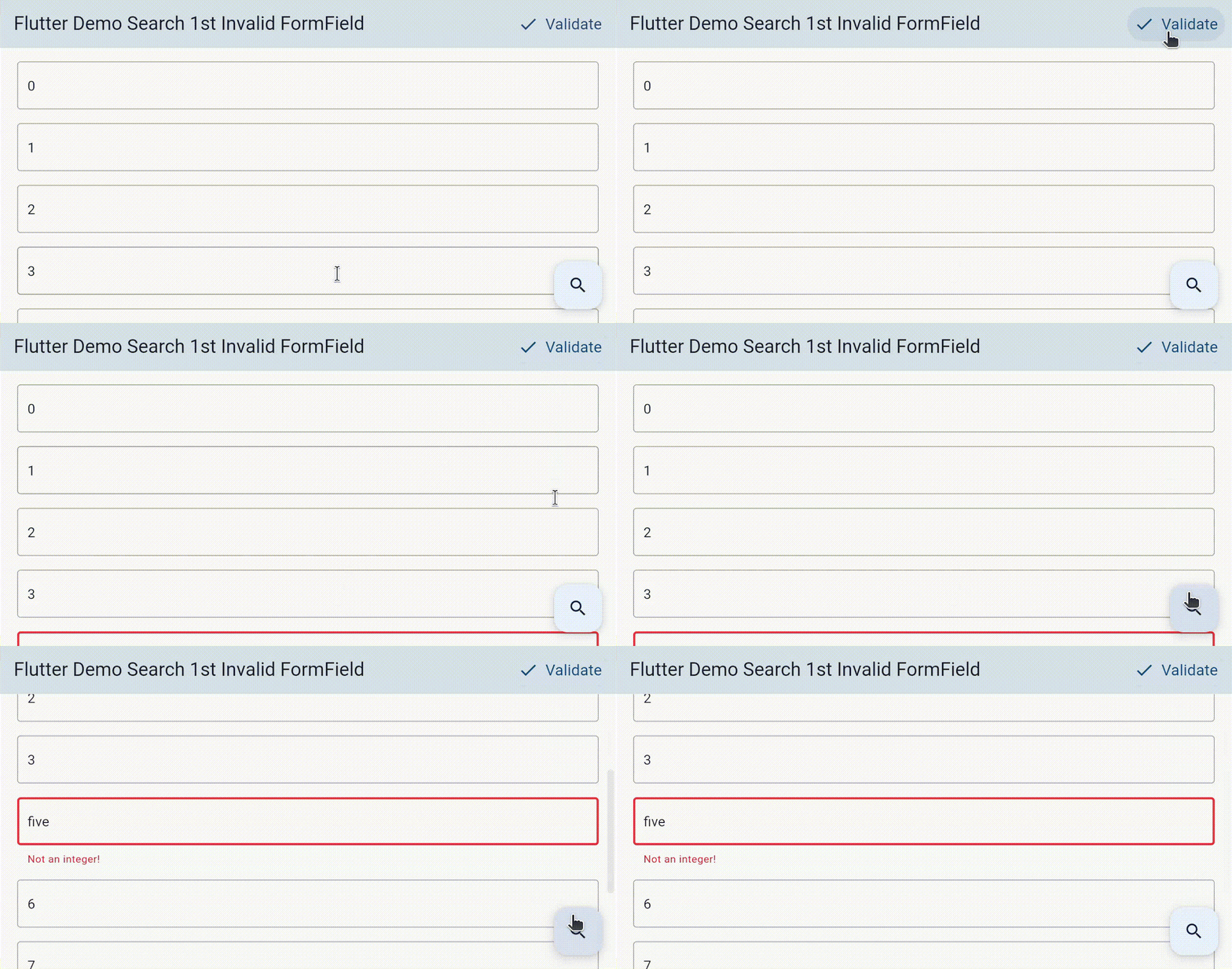
A workaround to track some FormFields in the tree. Support checking FormField is fully visible and scrolling into the view.
Read my article on

Do you want functionality like scrolling to the first invalid form?
You don't want to maintain a list of keys for your form fields by yourself?
Because we cannot access registered FormFieldState in the Form widget by the GlobalKey<FormState> to determine which FormFieldState has validated error. So... To make fields property of FieldState publicity, please give a 👍 to the issue #67283.
In while, maybe this workaround will help you. Beside flutter_form_builder, ready_form.
🔍 Features #
-
Tracking registered widget.
-
Can auto-scroll to the first Form's invalid field.
-
Each registered FormField widget contains its key, error text and method to scroll its into view and check is it fully visible.
📦 Dependency #
-
flutter sdk >=3.7.0
-
dart sdk >=2.19.0 <3.0.0
For the older flutter sdk:
💽 Installation #
dependencies:

  flutter_form_registry: ^0.6.3
📺 Usage #
- Wrap the widget that contains all the form fields by
FormRegistryWidget.
To access all the registered form fields, give the FormRegistryWidget a GlobalKey<FormRegistryWidgetState>, or calling FormRegistryWidgetState.of static method.
These parameters defaultAlignment, defaultDuration, defaultCurve, defaultAlignmentPolicy let you setup the default behavior when scrolling to the error fields.
-
There are two cases regarding your form field widgets that you need to know before continuing:
- You have customized a widget that extends FormField.
- You are using widgets from the framework or customizing widgets from a package.
With the first one, you should:
- Use the mixin
FormFieldRegistrantMixinin the class that extendsFormField. - Override
registryIdandlookupPriority. - This
registryIdis used to identify between otherFormFields. It is nullable, so you only need to pass the value only when you need to validate. - When the visibility of a
FormFieldchanges (e.g. from being invisible to visible using theVisibilitywidget), or when it is reinserted into the widget tree (activate) after having been removed (deactivate), it will be registered as the last one in the set. Consequently, when looking for the first invalid field, thisFormFieldwill not be retrieved, but another one will be. If you consider this as an issue, all you need to do is to set thelookupPriorityto arrange thisFormField.
class CustomTextFormField extends FormField<String>
    with FormFieldRegistrantMixin {
  CustomTextFormField({
    Key? key,
    this.registryId,
    this.lookupPriority,

    // some code ...

  });

  // some code ...

  @override
  final String? registryId;

  @override
  final int? lookupPriority;
}
- Use the
FormFieldStateRegistrantMixinfor the class that extendsFormFieldState.
class _CustomTextFormFieldState extends FormFieldState<String>
    with FormFieldStateRegistrantMixin {
  // some code ...
}
You can also override the default behavior that has been set up in FormRegistryWidget when scrolling to your customized widget.
class _TextFormFieldState extends FormFieldState<String>
    with FormFieldStateRegistrantMixin {
  @override
  double get alignment => yourAlignment;

  @override
  Duration get duration => yourDuration;

  @override
  Curve get curve => yourCurve;

  @override
  ScrollPositionAlignmentPolicy get alignmentPolicy => yourAlignmentPolicy;

  // some code ...
}
With the second one, you need to:
- Wrap the widget that contains the form field by
FormFieldRegistrant. - There are some mandatory parameters:
registryId,validator, andbuilder. - The
builderfunction should acceptGlobalKey<FormFieldState<T>>andFormFieldValidator<T>as arguments, and these parameters need to be passed to the widget that represents the form field.
An example with package date_field.
FormFieldRegistrant(
  registryId: 'select date',
  validator: (DateTime? value) {
    if (value == null) {
      return "Empty!";
    }

    if (value.isBefore(DateTime.now())) {
      return 'The date must be before today';
    }

    return null;
  },
  builder: (
    GlobalKey<FormFieldState<DateTime>> formFieldKey,
    String? Function(DateTime?) validator,
  ) {
    return DateTimeFormField(
      key: formFieldKey,
      validator: validator,
      onDateSelected: (value) {
        setState(() {
          selectedDate = value;
        });
      },
      mode: DateTimeFieldPickerMode.date,
      initialValue: selectedDate,
    );
  },
),
If your actual form field has restorationId, you should be passing it to the FormFieldRegistrant as well.
You can also override the default behavior that has been set up in FormRegistryWidget when scrolling to this widget.
FormFieldRegistrant has a parameter named formFieldKey, give it your own key if you need to access the form field state.
Metadata
Publisher
unverified uploader
Weekly Downloads
Metadata
A workaround to track some FormFields in the tree. Support checking `FormField` is fully visible and scrolling into the view.
Repository (GitHub)
View/report issues
License
 unknown (license)

