
splashify 0.0.3  splashify: ^0.0.3 copied to clipboard
Splash Screen Simplified
Splashify #
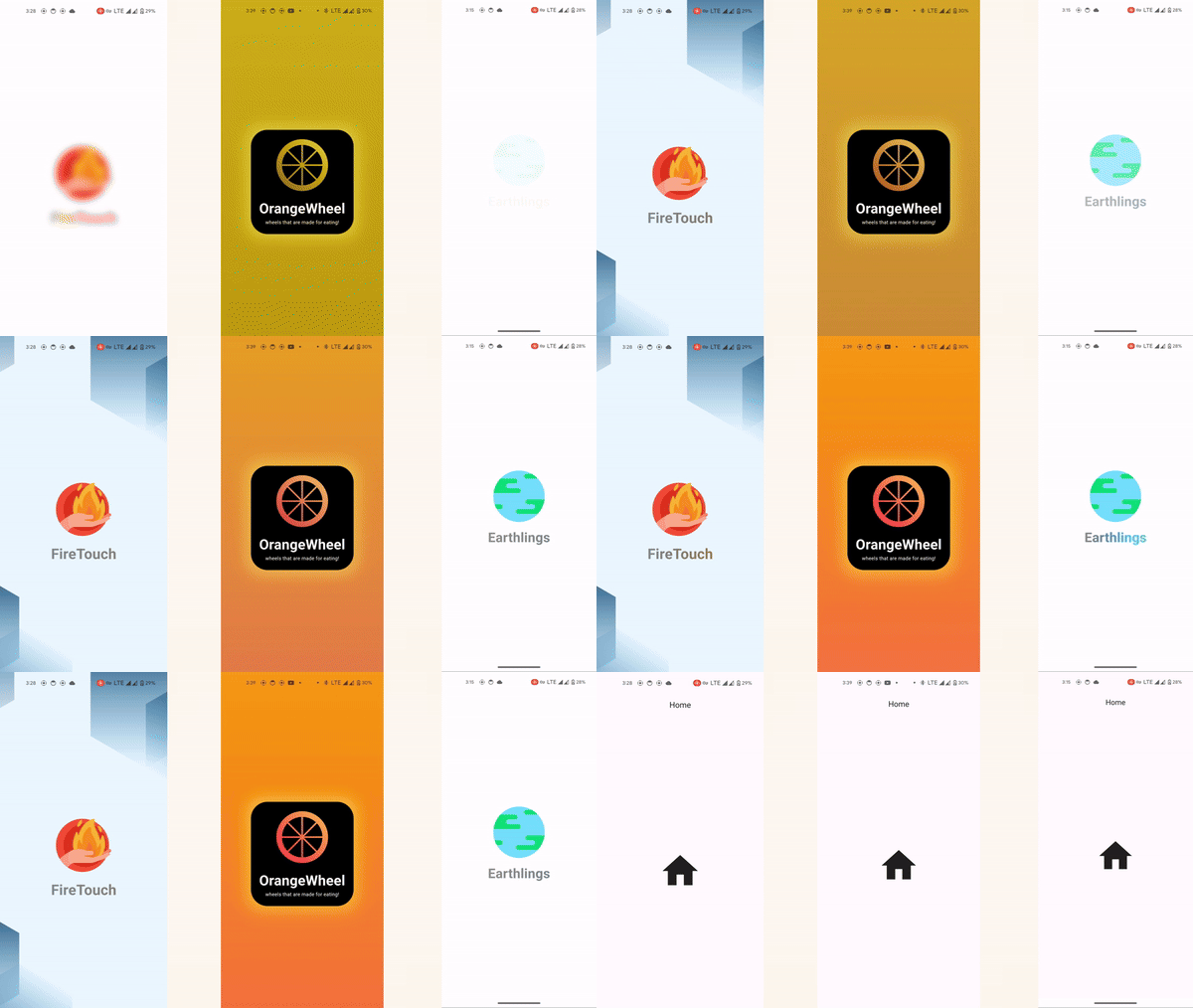
Splashify is a versatile Flutter widget that provides a customizable splash screen experience with features like animated transitions, image fading, title animations, and more. Easily create engaging splash screens for your Flutter apps with Splashify.
Features #
Splashify is a versatile Flutter package that allows you to create stunning splash screens for your applications. Here are some of the key features:
-
Customizable Splash Screen: Create fully customizable splash screens with various animations and effects.
-
Title and Subtitle: Add main titles and subtitles to your splash screen with customizable styles such as font size, color, and weight.
-
Background Images and Colors: Set background images or colors for your splash screen to create visually appealing introductions to your app.
-
Navigation Animations: Apply fade-in and slide animations during navigation from the splash screen to the main content of your app.
-
Frame Customization: Customize frame border radius, glow effects, and frame color to enhance the appearance of your splash screen.
-
Color Blending Animation: Apply color blending animations to create eye-catching transitions between different elements of the splash screen.
-
Blur Animation: Add blur animations to the splash screen for a modern and sleek introduction to your app.
-
Easy to Use: Simple and intuitive API makes it easy to integrate Splashify into your Flutter projects.
-
Comprehensive Documentation: Detailed documentation and examples to help you get started with Splashify quickly.
Explore these features and unleash your creativity in designing captivating splash screens for your Flutter applications!
Getting started #
Before you start using the Splashify package, make sure you have the following prerequisites:
- Flutter installed on your machine. You can download and install Flutter from the official Flutter website.
- An existing Flutter project where you want to integrate the splash screen.
Once you have Flutter set up, you can add the Splashify package to your project by following these steps:
- Add the dependency to your
pubspec.yamlfile:
yaml dependencies: splashify: ^0.0.1
-
Run flutter pub get to install the package.
-
Import the package in your Dart code:
import 'package:splashify/splashify.dart';
Usage #
To use the Splashify package, you need to create an instance of the Splashify widget and specify the required parameters. Here's a basic example of how to use it:
import 'package:flutter/material.dart';
import 'package:splashify/splashify.dart';

void main() {
  runApp(MyApp());
}

class MyApp extends StatelessWidget {
  @override
  Widget build(BuildContext context) {
    return MaterialApp(
      home: Splashify(
        title: 'My App',
        imagePath: 'assets/logo.png',
        navigateDuration: 3, // Navigate to the child widget after 3 seconds
        child: MyHomePage(), // Your main app screen widget
      ),
    );
  }
}

class MyHomePage extends StatelessWidget {
  @override
  Widget build(BuildContext context) {
    return Scaffold(
      appBar: AppBar(
        title: Text('My App'),
      ),
      body: Center(
        child: Text('Welcome to my app!'),
      ),
    );
  }
}
Attributes #
child: Choose what appears after the splash screen - your main app content.
title: The big text at the top that welcomes users to your app.
imagePath: The location of your app's logo or icon.
frameBorderRadius: Decide if the edges of your frame are smooth or sharp.
backgroundColor: Pick the color behind your splash screen.
titleFadeIn: Make your main title gradually appear for a stylish entrance.
imageFadeIn: Have your app's image slowly come into view for added effect.
imageSize: Control how big or small your app's image appears.
navigationDuration: Choose how quickly users move from the splash screen to your app.
titleSize: Adjust the size of your main title to make it stand out.
titleColor: Select the color of your main title.
titleBold: Make your main title bold for added emphasis.
colorBlend Animation: Add a smooth color transition effect for a touch of flair.
backgroundGradient Color: Create a smooth transition of colors for your background.
blurIntroAnimation: Start your app with a cool blur effect that gradually clears.
slideNavigation: Make your splash screen slide away to reveal your app's content.
fadeInNavigation: Smoothly transition from the splash screen to your app.
enableFrame: Add a stylish frame around your splash screen.
frameColor: Choose the color of your frame to match your app's design.
frameGlowColor: Add a glowing effect to your frame for extra appeal.
glowIntensity: Adjust how strong the glow effect appears.
colorizeTitleAnimation: Make your main title change colors for a fun effect.
colorizeTileAnimationColors: Pick the colors for your title's color-changing animation.
backgroundImage: Use an image as the background for your splash screen.
subTitle: Add a smaller title below your main title for extra information.
heightBetween: Control the spacing between elements on your splash screen.
backgroundImageDarkness: Adjust the darkness of your background image for the perfect look.
Additional information #
Visit the package on pub.flutter-io.cn for more information and documentation. You can also explore examples and contribute to the package on pub.flutter-io.cn.
If you encounter any issues or have suggestions for improvements, please file an issue on pub.flutter-io.cn. Contributions are welcome!
Copyright (c) 2024 Naurez Jiffry
Metadata
Publisher
unverified uploader
Weekly Downloads
Metadata
Splash Screen Simplified
Documentation
License
 MIT (license)
Dependencies
animated_text_kit, flutter, flutter_animate

